


























How Much Does it Cost to Build an App Like Jerry: Features, Tech Stack, and Process
With active smartphone users increasing in the world, it is no surprise that the demand for mobile app development keeps rising. If you are thinking about developing an app, the very first thing that comes to mind is the cost.
This question, related to cost matters, is even more relevant in insurance platforms. These applications rely on securing user data and offering a smooth flow for their customers. Apps like Jerry show how a digital platform can make insurance easier for users while helping businesses reduce manual service pressure.
Traditional app development was expensive, but modern AI tools have made it possible to build affordable apps. So if you have a great app idea and are excited about that, this is the guide for you. This helps explain the insurance app development cost.
It also breaks down the cost to build an insurance app like Jerry. This guide can help businesses to plan their project with more budget clarity.
What Is the Jerry App and Why Is It Popular?
Jerry is a mobile app that helps users compare insurance options and manage car-related needs in one place. It focuses on making insurance easier for people who do not want long forms or repeated calls. The app allows users to compare rates and buy policies. They can also track driving habits and check repair costs to manage policy support through the app.
Its popularity comes from convenience. The app not only helps with insurance comparison but also supports car care and driver insights. This makes it useful beyond one purchase. Users can return to the app for updates and vehicle reminders.
For businesses, Jerry shows how a simple app idea can become a wider digital service model. It combines insurance access with support tools that improve user trust and retention. This is why understanding insurance app development cost matters before building a similar product.
The cost depends on how many features the business wants to include and how deeply the app connects with insurance systems.
Insurance App Development Cost Like Jerry
Cost planning should start with product depth rather than a fixed number. A simple insurance app only needs quote requests and basic support. But an app similar to Jerry needs more; it may include a quote comparison policy. It could also include purchase rate and car care.
1. Starter Insurance App
A starter app can cost around $30000 to $60000. This type of app works well for businesses that want to test the market first. The app can include basic features like user login and quote request forms. It can also have push alerts and a simple admin panel.
2. Growth Level Insurance App
A growth level app can cost around $60000 to $150000. This version supports more complete user flows. It can include payment support and renewal alerts. It could also have document upload, claim status, and API connections with insurance systems.
3. Advanced App Like Jerry
The insurance app development cost, like Jerry, can reach $150000 to $300000 or more when the app needs deeper automation. The budget increases when the platform includes real-time comparison and custom recommendations. Adding more advanced features could increase the app cost.
The cost to build an insurance app like Jerry also depends on the launch strategy. A business can begin with a minimum viable product or MVP. MVP means the first usable version of the app. This helps validate the idea before adding artificial intelligence suggestions and deeper carrier integrations.
Key Factors Affecting the Cost to Build an Insurance App Like Jerry
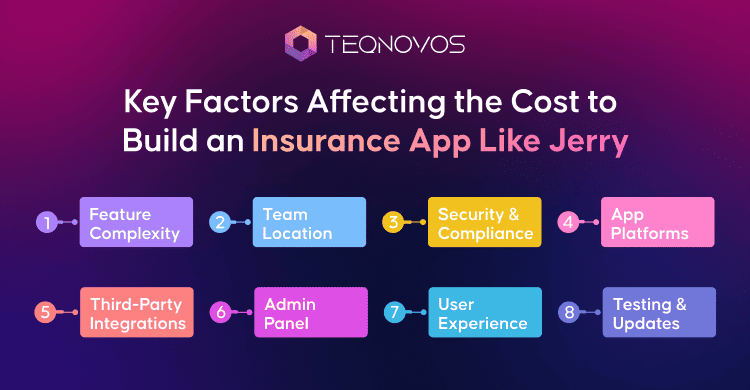
The cost to build a mobile app depends on the features added and business requirements. A basic app may only support quotes and policy access. On the other hand, a stronger platform needs comparison tools and more advanced tools.
1. Feature Complexity
Features create the biggest cost difference. Simple features need less time and fewer resources. Advanced features need more planning, testing, and backend logic. Adding modern features like quote comparison and policy purchase claims increases the overall budget.
2. App Platforms
The platform choice also affects pricing. A business may launch on Android first. It may choose iOS first. It may also build for both platforms at the same time. A cross-platform approach can reduce effort in some cases. Native apps may cost more but can offer stronger performance.
3. Third-Party Integrations
Insurance apps often need external system connections. The apps need external tools integrated into the app, like payment gateways and data providers, for a seamless experience. Each connection needs secure data flow and proper testing. This can increase development time.
4. Security and Compliance
Insurance apps handle sensitive user data. This includes personal details, policy records, payment data, and claim documents. Strong encryption, role-based access, audit logs, and secure storage are important. These security layers can affect the final insurance app development cost.
5. User Experience
A clean user journey can reduce confusion and support requests. The app should be able to make all the processes clear and easy for the user. The customer should be able to make quote comparisons and payments easily. Better design takes more time, but it improves trust and user retention.
6. Admin Panel
The admin side is just as important as the user app. This panel helps teams handle the complete app in one place. They can control policy management and review claims. A more powerful backend needs more development effort.
7. Team Location
The team location can change the budget. Developers in North America and Western Europe often charge more. Offshore development teams can reduce cost while still supporting quality if the process is planned well.
8. Testing and Maintenance
Insurance apps need careful testing before launch. Payment flows and notifications must work without errors. After launch, the app also needs updates and system monitoring.
Must-Have Features of an App Like Jerry
A Jerry-like app should make insurance discovery simple and useful. It guides users through quote discovery and account management in one smooth journey. Each feature reduces effort for the user and helps the business manage insurance operations with better speed and accuracy.
1. User Registration
The app allows users to create accounts and manage personal details safely. A strong profile section stores complete customer data, including their vehicle details and contact information. This helps users continue their journey without filling in the same details again.
2. Insurance Quote Comparison
Quote comparison is one of the most important features in this app model. Users can compare their options to get the best value. They can compare prices and benefits that fit their needs. This makes the decision process easier and helps users find a suitable option faster.
3. Policy Purchase and Management
The app supports policy purchase and gives users quick access to digital policy details. Users can view active plans, download documents, check renewal dates, and update basic information when needed. This keeps the app useful after the first quote or purchase.
4. Smart Rate Checks
Smart rate checks help users find better prices over time. The app can notify users when a more suitable plan becomes available. This feature improves retention because users get ongoing value after signing up.
5. Claims Support
Claims support makes the reporting process simple. This allows users to keep their information in the app, like documents and photos. They can check claim status and receive updates inside the app. This reduces service delays and gives users more confidence during stressful situations.
6. Payment and Alerts
Secure payment support creates a smoother insurance journey. The app also sends renewal alerts before a policy expires. This helps users avoid missed deadlines and gives businesses a better way to maintain customer relationships.
7. Agent and Support Access
Some users still need help before choosing a policy. The app can offer a chat support option to discuss and can provide guided assistance to make a decision. This feature helps users make better decisions when policy details feel complex.
8. Car Care and Driver Tools
Car care features make the app useful beyond insurance buying. Businesses can add repair estimates and maintenance reminders. These tools increase user engagement and make the app a regular part of the customer journey.
Adding these features determines the Jerry like insurance app development cost for businesses. However, businesses can choose custom insurance app development services to build an app that stands out.
Plan your insurance app development cost —build a secure app like Jerry with Teqnovos.
Schedule a CallAdvanced Insurance App Features for Better User Retention
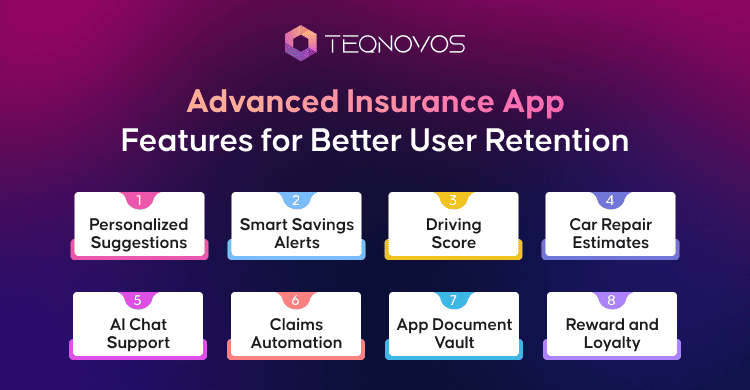
Advanced features make an insurance app more useful after the first quote. They help users return to the platform for savings updates and personalized insights. These features also help businesses improve retention and create more value from each customer relationship.
1. Personalized Recommendations
The app can study complete user details, and coverage needs to suggest better insurance options. This makes the experience more relevant. It also helps users compare plans with more confidence.
- Suggests policies based on user profiles
- Matches coverage with real needs
- Improves quote selection accuracy
- Reduces confusion during comparison
2. Smart Savings Alerts
Savings alerts notify users when a better rate or suitable policy becomes available. This keeps users engaged even after they buy a policy. It also positions the app as a helpful savings tool.
- Sends alerts for better rates
- Keeps users active after purchase
- Supports renewal decision making
- Builds trust through ongoing value
3. Driving Score
Driving insights can track safe driving habits and present a score to the user. This feature adds value for users who want to understand their driving patterns. It can also support future pricing models when connected with insurer systems.
- Tracks driving behavior patterns
- Shows safe driving scores
- Supports usage-based insurance
- Encourages better driving habits
4. Car Repair Estimates
Car care tools can show repair estimates and service records. This turns the app into a wider vehicle support platform. Users get more reasons to open the app even when they are not shopping for insurance.
- Shows estimated repair costs
- Sends maintenance reminders
- Stores vehicle service records
- Increases app usage beyond insurance
5. AI Chat Support
AI chat support can answer common user questions faster. It can guide users through quotes, policy details, claims, and renewals. Human agents can then focus on complex cases that need personal attention.
- Answers common questions faster
- Guides users through app flows
- Reduces support team workload
- Improves response time for users
6. Claims Automation
Claims automation makes the claim process faster and easier. Users can submit their details and upload their documents. They can keep track of their progress and receive updates in the app. This improves customer trust during high-stress situations.
- Allows digital claim submission
- Supports document and photo upload
- Sends real-time claim updates
- Reduces manual claim handling
7. App Document Vault
A document vault stores policy papers and vehicle records in one secure place. Users can access important details whenever they need them. This creates convenience and improves long term app usage.
- Store policy documents safely
- Keeps claim records organized
- Gives quick access to receipts
- Reduces paperwork for users
8. Reward and Loyalty Features
Rewards can motivate users to stay active inside the app. Businesses can offer safe driving rewards or service discounts. These features can increase engagement without making the app feel sales-heavy.
- Encourages repeat app usage
- Supports referral-based growth
- Rewards safe driving actions
- Improves customer retention
The Jerry like insurance app development cost can increase when these advanced features are added. Yet they also help the product stand out. A business can launch with core features first and add advanced tools once users start engaging with the platform.
Step-by-Step Process to Build an App Like Jerry
Building a Jerry style insurance app needs a clear process. Each stage affects the final product quality. It also impacts the cost to build insurance app like Jerry because planning gaps can increase time and rework.
1. Define the Business Model
The process starts with a clear business model. The company needs to decide how the app will create value. It can focus on the different aspects of the app, such as quote comparison or policy sales. They could also offer a complete insurance management journey.
2. Research User Needs
User research helps define what customers expect from the app. It shows how users compare policies and what problems they face. They can review the features that can make the process easy. This step helps build a product that solves real user pain points.
3. Finalize Core Features
The next step is feature planning. This depends on the business requirements. They can include a user profile option for complete information and support options. Advanced tools can be added later based on user response.
4. Create UI and UX Design
UI means the visual layout of the app, and UX means how easily users move through the app. A clean design helps users compare plans and handle the app easily. This helps them make payments and manage policies without confusion.
5. Build the Backend System
The backend manages the complete data. It controls user accounts and all the admin actions, including the claims. A strong backend keeps the app secure and stable as more users join the platform.
6. Tools Integrations
Insurance apps need secure system connections. These can include payment gateways and policy systems. It can also include email tools and call tools for a seamless experience. API integrations help these systems share data safely.
7. Test the App
Testing checks every user flow before launch. The team tests the app for logins and proper notifications. The idea is to clear the app for errors and bugs, if any. This helps reduce errors and improve the launch experience.
8. Launch the First Version
The first launch can start with a minimum viable product. It helps the business enter the market faster and collect real user feedback.
9. Improve After Launch
The app needs regular updates after launch. The team can improve features and fix issues if they occur. They can also add new tools to refine the user experience journey. This helps the product stay useful and competitive over time.
Final Thoughts
Building an app like Jerry needs more than an idea. It needs the right scope and secure architecture for a clear launch plan. The insurance app development cost depends on various factors, such as the platform choice and future growth needs.
Businesses can reduce risk by starting with a focused first version and improving it with real user feedback. A planned approach helps control the budget and builds stronger user trust.
To plan a reliable insurance app with practical cost guidance, connect with Teqnovos and discuss the right development roadmap today.