



























How to Automate Real Estate Lead Generation With a No Code App
Real estate teams collect leads from many places. Leads come from several sources, such as websites, property portals, and ads. Other sources include social media campaigns and referrals. The real problem starts after the lead arrives. Many teams lose serious buyers and sellers because follow up takes too long. Some leads stay inside spreadsheets. Some go to the wrong agent. And some never get a response at the right time.
This is where real estate lead generation automation becomes useful. It helps property businesses capture leads faster. This also helps them in qualifying the leads and allocating them to the correct agents. A no-code app development could be used for making this task simpler, as no programming skills are needed to build forms, dashboards, etc.
A real estate lead generation app can bring all leads into one place. It can support faster follow up and better real estate lead management. It can also help teams track source quality and agent activity. In this guide, we will explain how businesses can automate real estate lead generation with a no code app and build a lead system that can scale over time.
What Is Real Estate Lead Generation Automation
Real estate lead generation automation means using digital workflows to collect, assign, and track property leads. It removes repeated manual tasks from the lead process. It also helps agents respond faster when a buyer, seller, or investor shows interest.
A manual process can slow down the team. Leads may stay in email inboxes, forms, or chat tools. Agents may not know which lead needs urgent attention. This can reduce trust and lower conversion.
Automation changes this process. It sends every lead into one system, then scores the lead based on the budget location property needs and timeline. It can also send alerts to the right agent. This makes real estate lead management more structured and easier to track.
A real estate lead generation app built with a no code app builder can handle these workflows without long development cycles. It gives real estate teams a faster way to manage inquiries and improve follow up.
Real Estate Lead Automation Framework
A real estate lead system works best when every step has a clear purpose. Teams can use the capture, qualify route, follow up track framework to automate the full lead journey.
Capture
Collect leads from websites, landing pages, and property portals. Other sources include ads, social media, and referrals. Every lead should enter one central dashboard so agents do not miss new inquiries.
Qualify
Sort leads based on budget, location, property type, timeline, and intent. This helps agents understand which buyers, sellers, or investors need faster attention.
Route
Send each lead to the right agent based on property type, price range, or availability. Clear routing improves ownership and reduces delays.
Follow Up
Create reminders and alerts for calls, messages, and property visits. This helps teams keep communication active without depending on manual tracking.
Track
Monitor lead source status, response time, and conversion. This helps managers improve real estate lead generation automation with real data.
This framework keeps the process simple. It also helps teams build a real estate lead generation app that supports faster follow up and cleaner real estate lead management.
Turn real estate leads into booked calls with a smarter no-code app. Build Your Lead Automation System With Teqnovos!
Schedule a CallWhy Real Estate Teams Need Lead Automation Now
Real estate teams deal with fast moving leads. A buyer may fill out a form and contact another agent within minutes. A seller may compare many agencies before booking a call. This makes speed and structure important for every property business.
Manual tracking can create gaps in the lead journey. One lead may stay unread in an inbox. Another lead may reach the wrong agent. A high-intent buyer may not get a follow up at the right time. These small delays not only reduce trust but also lower conversion.
Real estate lead generation works better when every inquiry enters one clear system. Teams can see the lead source status, budget property needs, and next action. This gives agents better control over daily follow up.
A structured app can also support real estate workflow automation. It can reduce repeated tasks and improve agent response. It can send alerts, create tasks, and update lead stages without manual effort.
How a No Code App Builder Helps Automate Real Estate Lead Generation
A no code app builder helps real estate teams build simple apps without complex coding. It gives teams a faster way to create dashboards and workflows. This helps them manage leads in one clear system.
Central Lead Capture
A real estate team can collect leads from websites, landing pages, and ads. Each lead can move into one shared dashboard. This reduces scattered data and missed follow-ups.
Smart Lead Assignment
The app can assign leads to agents based on location and budget. Property type and availability also matter. This helps the right agent contact the right lead at the right time.
Faster Follow-Up
A lead generation app can send instant alerts when a new inquiry arrives. It can also create reminders for calls and property visits. This helps teams automate real estate lead generation with less manual effort.
Clear Lead Tracking
Agents can view the lead status, source property interest, and next action all in one place. This makes real estate lead management easier and more transparent.
Better Reporting
Teams can track which channels bring better leads. They can also check agent response time and lead progress. This helps real estate businesses improve their lead process with real data.
Key Features of a Real Estate Lead Generation App
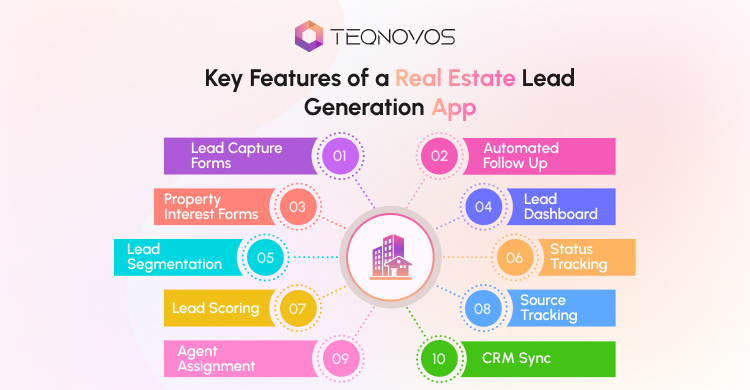
A real estate lead generation app works best when it covers the full lead journey. It should capture leads, assign them, and track every action. Teams can also study important real estate app features before they plan the final app structure.
Lead Capture Forms
Lead capture forms collect basic user details. They may require name, contact number, and email ID. Other essential information includes address, property type, and budget amount. Short forms should be used since they can be completed quickly.
Property Interest Forms
Property interest forms help teams understand what the user wants. The form can collect details about buying, selling, renting, or investing. This makes real estate lead management more useful for agents.
Buyer And Seller Lead Segmentation
Buyer leads and seller leads need different workflows. A buyer may need property matches and viewing options. A seller may need valuation support and a listing call. Segmentation helps teams send each lead to the right path.
Lead Scoring
Lead scoring ranks leads based on their intent. A lead with a clear budget and short timeline may need faster action. This helps agents focus on serious prospects first.
Lead Scoring Table
Lead scoring helps agents focus on the leads that are most likely to take action. A simple scoring model can rank each lead based on intent, budget timeline, and property match.
| Lead Signal | Low Intent | High Intent | Suggested Action |
| Budget | No clear budget | Budget matches the listed property | Send to the agent faster |
| Timeline | Just browsing | Wants to buy, sell, or rent soon | Mark as priority lead |
| Location | Broad area request | Specific location selected | Assign by area expert |
| Property Type | Unsure about needs | Clear property type chosen | Send matching listings |
| Contact Details | Incomplete details | Valid phone and email shared | Trigger a quick follow-up |
| Repeat Activity | One form visit | Multiple inquiries or page visits | Create an urgent task |
Agent Assignment
Agent assignment sends leads to the right person. The app can assign leads by area, property type, or agent availability. This supports faster follow up and better ownership.
Automated Follow Up
The automation process helps in ensuring continuous communication between the agent and the prospect. The application is able to generate emails, messages, and assign tasks in order to keep the lead active even when there are multiple requests being made.
Lead Dashboard
A lead dashboard shows all leads in one place. Agents can see new leads and active leads. They can also track qualified leads and closed leads. This gives the team better control over daily work.
Status Tracking
Status tracking shows where each lead stands. Teams can use stages like new contacted qualified visit, booked, and closed. This helps managers spot delays and improve the process.
Source Tracking
Source tracking shows where each lead came from. The source can be a website, a social media page, a referral, or a portal. This helps teams understand which channel brings better real estate lead generation results.
Customer Relationship Management Sync
A CRM sync helps teams connect the app with their existing sales system. This keeps lead records updated across platforms.
Notifications And Alerts
Notifications help agents act faster. The app can notify the concerned agent whenever a new query comes. It can also notify the team about the follow-up reminder.
Reporting And Analytics
Reporting helps teams measure lead quality and agent performance. Teams can track source quality, response time, and conversion rate. This makes real estate lead generation automation easier to improve over time.
Step-by-Step Process To Automate Real Estate Lead Generation With a No Code App
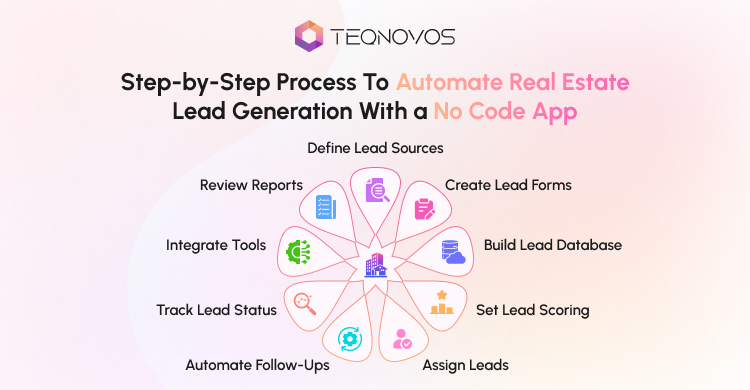
A clear process helps real estate teams build the right lead system. It also helps them avoid extra features that do not support sales. The goal is simple. Capture every lead, qualify them, and send them to the right agent.
Step 1: Define the Lead Sources
The team should first list every lead source. Leads may come from the website. The sources of short forms can also include advertisements, social media platforms, and landing pages. This helps the team track the beginning stage of real estate lead generation.
Step 2: Create Lead Capture Forms
Short forms can be created within the application by the team. Each form should collect only useful details. This may include name, phone, or budget and timeline. Short forms reduce friction and improve form completion. Short forms increase efficiency and ease the completion process of the form.
Step 3: Build a Central Lead Database
A central database keeps all leads in one place. The team can add fields for source status and location. This way, they can track every lead.
Step 4: Add Lead Scoring Rules
Lead scoring makes it easier for agents to locate quality leads sooner. The app can score leads based on budget, location match, and property need. A high score can trigger faster follow up.
Step 5: Assign Leads to Agents
A no code app builder can support simple lead routing rules. The leads can be sent to agents on the basis of the location of the property, type of property, price ranges, or availability. This improves ownership and reduces delays.
Step 6: Set Automated Follow Ups
The application can generate reminders for phone calls or site visits. This helps teams automate real estate lead generation without losing personal contact.
Step 7: Track Lead Status
Lead status helps the team see progress. Common stages can include a new contact qualified visit, booked negotiation, and closed. This makes real estate lead management easier for agents and managers.
Step 8: Connect With Existing Tools
The app can connect with CRM tools, email tools, and spreadsheets. Teams that need deeper listing owner, tenant, and deal workflows can also explore property management software development.
Step 9: Review Lead Reports
Reports show what works and what needs improvement. The team can track source quality response time, agent activity, and conversion rate. This helps improve real estate lead generation automation over time.
How Artificial Intelligence Supports Real Estate Lead Generation
Artificial Intelligence is also called AI. It helps software study data and suggest useful actions. In real estate lead generation AI can help teams understand which leads need faster attention.
AI real estate lead generation does not replace agents. It supports agents with better insights. It can study lead behavior, budget, or location. Then it can help the team decide which lead has stronger intent.
Lead Intent Detection
AI can study form details page visits and inquiry patterns. It enables an individual to find leads that demonstrate genuine interest. This assists the agent in concentrating on the leads that might act faster.
Predictive Lead Scoring
A predictive lead score is an estimate of the likelihood of future behavior. AI can give higher scores to leads with clear budgets and matching property needs. This can improve real estate lead generation automation.
Follow-Up Suggestions
AI can suggest the next best action for each lead. It may suggest a call message property update or a viewing reminder. This helps agents follow up with more context.
Repeated Inquiry Detection
Some users send the same inquiry through different channels. AI can help detect repeated entries. This keeps the lead database cleaner and supports better real estate lead management.
Smarter Workflow Support
AI can support real estate workflow automation by helping teams route leads faster. It can also help create task reminders and follow up notes. This gives the team more time to focus on sales conversations.
Better Lead Quality Over Time
A lead generation app can improve when the team tracks data regularly. AI can study which sources bring better leads. It can also show which lead types move closer to conversion. This helps teams improve their lead process with real insights.
Capture, qualify, and route property leads before they go cold. Launch Your Real Estate Lead Generation App With Teqnovos!
Schedule a CallReal Estate Workflow Automation Beyond Lead Capture
Real estate workflow automation does more than collect new leads. This assists the management when dealing with follow-up procedures. It provides clarity to the agents and property managers.
Inquiry Routing
The app can route each inquiry to the right team member. A buyer lead can go to a sales agent. A seller lead can go to a listing expert. A rental lead can go to the rental team. This creates faster ownership.
Visit Booking
The app can help agents manage viewing requests. It can show available time slots and create visit reminders. It can also update the lead status after the visit gets booked.
Agent Tasks
Agents can get task alerts for call messages, follow ups, and document requests. This reduces missed actions. It also helps managers see which tasks need attention.
Deal Updates
A lead can move through clear stages inside the app. The stages may include a new contacted qualified visit, a booked offer, and a closed lead. This gives the team a better view of every active opportunity.
Client Follow-Up
A lead generation app can remind agents to contact leads at the right time. It can also send helpful updates about property matches, viewing details, or next steps. This improves real estate lead management without adding more manual work.
Platform Growth
As workflows grow, the business may need deeper features. These can include owner portals, tenant portals, listing tools, and advanced reports. Teams that want a larger product can explore real estate SaaS platform development to plan the next stage.
Common Mistakes to Avoid in Real Estate Lead Generation Automation
Real estate lead generation automation works best when the process stays simple and clear. Many teams add tools before they fix the actual lead journey. This can create more confusion instead of better results.
Long Lead Forms
Long forms can reduce lead submissions. A user may leave the page when the form asks too many questions. A real estate team can start with a name, phone, or email, and a timeline.
No Lead Scoring
Every lead does not have the same value. Some users are ready to book a visit. Some users only want basic information. Lead scoring helps agents focus on high intent leads first.
Poor Agent Ownership
A lead can get lost when no agent owns it. A real estate lead generation app can assign each lead to the right agent. This makes follow up clear and faster.
Weak Follow-Up Timing
Slow follow-up can reduce trust. The app can send alerts and task reminders when a new inquiry arrives. This helps the team respond while the user still shows interest.
No Source Tracking
Teams need to know where leads come from. A lead source can be a website, ad portal, or social page. Source tracking helps improve real estate lead generation performance over time.
Missing Consent Tracking
Lead automation needs clear consent. The app can include opt-in fields and consent records. This helps the business manage contact permissions in a safer way.
No Reporting
A lead generation app needs simple reports. Teams can track response time, lead stage, and agent activity. These insights help improve real estate lead management without guesswork.
Consent and Data Handling Checklist for Real Estate Leads
A real estate lead generation app collects personal details from buyers, sellers, and investors. This may include names, phone numbers, and emails. Other important details might include budgets, property interests, and location preferences. So teams need clear consent and safe data handling from the start.
Use this checklist before launch:
- Add a consent checkbox to every lead form
- Explain how the team will use lead details
- Give users a simple opt-out option
- Store contact details in a secure dashboard
- Limit access based on agent role
- Track lead source for every inquiry
- Record consent before email or SMS follow-up
- Keep only useful lead information
- Avoid sharing lead data without permission
- Review privacy notes before publishing forms
Good consent tracking protects user trust. It also helps real estate teams manage follow-ups in a safer and more organized way. A no code app builder can support basic consent fields and access controls. Larger teams may need custom workflows when they manage high lead volume or multiple agents.
No Code vs Custom Development for Real Estate Lead Automation
A no code app works well when the lead workflow is simple. Custom development works better when the business needs deeper control, advanced integrations, or large scale workflows.
| Option | Best For | Limitations | When to Choose |
| No Code App | Simple lead capture dashboards and follow ups | Limited control over complex workflows | Choose this for early launch and basic lead tracking |
| Custom Development | Advanced routing, AI scoring, CRM sync, and reporting | Takes more time and budget | Choose this when lead volume grows, or workflows become complex |
| Hybrid Approach | Teams that want to start fast and scale later | Needs careful planning from the start | Choose this when no code can handle the first version, but custom features may be needed later |
A no code app builder can help real estate teams automate the first version faster. Custom development can support advanced lead scoring, deeper CRM integrations, agent performance dashboards, and long term scale.
Expert Insight From Teqnovos
Real estate lead automation works best when teams map the full lead journey before they build the app. Teqnovos recommends starting with five core workflows. These include lead capture, lead qualification, agent routing, and follow up reminders.
A no code app builder can support the first version when the workflow is simple. Teams can test forms, dashboards, reminders, and basic lead assignment first. Advanced features like AI lead scoring, CRM sync, custom dashboards, and multi branch routing can come later when lead volume grows.
This approach helps real estate businesses avoid overbuilding. It also helps teams launch faster, improve follow up, and create a stronger base for future real estate workflow automation.
Conclusion
Real estate teams need a faster way to handle leads. Manual tracking can slow response time and reduce lead quality. A no code app builder can help teams capture leads, assign them, and track follow up in one place. An effective app assists in enhancing real estate lead generation among buyers, sellers, and investors.
Businesses can start with no code app development when the workflow is simple. They can add custom features later when lead volume grows. With the right plan, teams can automate real estate lead generation and build a system that supports long-term growth.