




























Key Features To Consider In Real Estate App Development
The real estate software market is growing as property businesses invest in digital search, listing management, and user engagement tools. According to Grand View Research, the global real estate software market was valued at approximately USD 12.79 billion in 2025 and is expected to grow significantly through 2033.
Property businesses are investing in digital platforms to improve search, listing control, user engagement, and lead management. The real estate app development offers opportunities to investors and businesses looking to expand their businesses. The same shift has also increased demand for real estate app development services and skilled real estate app developers who can plan scalable property platforms.
A real estate app can help property businesses improve listing visibility, lead handling, and buyer engagement. It can also support agents, brokers, and property managers with faster access to user data and property activity.
Modern users expect a simple property search with clear listings. They also expect virtual tours, map views, and instant communication. Businesses need admin controls, analytics, and secure workflows to manage listings and leads. This is why real estate app development needs careful feature planning before design or coding starts.
Let’s explore the key features and development steps.
What Are the Key Features of a Real Estate App?
A successful real estate app should include advanced property search, map-based discovery, property detail pages, virtual tours, saved listings, agent profiles, in-app chat, visit scheduling, lead management, analytics, and secure payment tracking. Additional features such as AI recommendations, mortgage calculators, CRM integration, and document management can further improve user experience and business performance.
Must-Have Features in Real Estate App Development
Features define how users search properties, compare options, and contact the right person. A strong app should make every action simple. It should also support property teams with better control over listings, leads, users, and reports.
Property Search and Advanced Filters
Search is the core part of any property app. Users need to filter listings by location, price, and size. The type of property, number of rooms, and amenities are important too. It makes the app more helpful for buyers and agents.
Map-Based Property Discovery
Map-based discovery helps users explore properties by area. Users can check nearby schools, roads, transport, and local access. This feature improves location-based decisions during mobile app development for real estate. Accurate location data also helps users compare areas before booking a visit.
Property Detail Pages
A property detail page should show price, location, features, images, videos, and contact options. Clear pages help users make faster decisions. This also improves the quality of inquiries. A skilled real estate app developer can structure these pages to support faster property inquiries.
Image and Video Galleries
High-quality images and videos help users understand a property before a visit. Galleries should load fast and show every important area. This feature builds trust and improves engagement. Media handling also matters in real estate mobile application development because slow galleries can reduce user engagement.
Virtual Tours
Virtual tours let users check out properties without a physical visit. This feature works well for distant buyers, busy renters, and premium property listings. This also cuts down on unnecessary visits and boosts the quality of leads.
Saved Properties and Alerts
Saved properties help users shortlist listings for later review. Alerts can notify users about price drops, availability updates, and new matching listings. This keeps them engaged after their first visit, so they keep coming back. These tools support better real estate mobile app development because users can return to listings without starting a new search.
Property Comparison Tool
A property comparison tool helps users review multiple listings side by side. It can compare price, size, and location. This feature supports better decisions for buyers as well as for investors. It also keeps users engaged inside the app for longer sessions.
Mortgage Calculator
A mortgage calculator helps users estimate monthly payments based on property price and loan period. It supports users who want a clearer view of affordability before contacting an agent. This feature is useful for buyer focused platforms and real estate marketplaces.
AI Property Recommendations
Artificial intelligence helps property apps recommend listings based on user searches, saved properties, location interest, and budget range. This creates a more personalised experience and encourages repeat visits.
Agent and Broker Profiles
Agent and broker profiles build trust between users and property professionals. Profiles can show contact details, active listings, and ratings. Skilled real estate app developers can also add verified profile controls.
In App Chat or Inquiry Forms
Chat and inquiry forms help users contact agents without leaving the app. A simple form can capture details such as name, phone number, email, and property interest. This improves lead quality and response speed. Clean communication tools make real estate mobile application development more useful for agents and users.
Booking and Visit Requests
Booking features help users schedule property visits with agents or owners. Users can choose a preferred date and time. Property teams can manage requests from one dashboard. Scheduling also strengthens real estate mobile app development for apps that support property visits and agent calendars.
Push Notifications
Push notifications keep users updated about saved listings and price changes. They also alert users about new properties, visit approvals, and message replies. This feature improves engagement when used carefully. It also helps businesses bring users back to the app without depending only on email or calls.
Document Upload and E-Signature
Document upload helps users share rental forms, ownership records, identity documents, and other property related files. It helps users sign forms without visiting an office. This feature supports faster approvals and better document handling.
CRM Integration
CRM integration connects app leads with sales pipelines, agent tasks, and follow-up records. It helps property teams manage inquiries and improve conversion rates.
User Account Management
User accounts allow buyers, renters, and admins to manage activity. Users can easily update profiles and track inquiries. Secure account handling is important in real estate application development.
Admin Dashboard
The admin dashboard helps teams manage listings, user and agent approvals, and reports. A clear dashboard reduces manual work. It also gives businesses better control over daily operations. Dashboard planning is also important for mobile app development for real estate because teams need control over listings and users.
Lead Management System
Lead management helps property teams track inquiries and follow-ups. Agents can view lead source status and user interest. An experienced real estate app developer can build custom lead flows based on the sales process.
Listing Approval Workflow
A listing approval workflow helps prevent poor-quality or fake property data. Admins can review property details, images, prices, and ownership information before publishing. This improves platform trust.
Payment or Rent Tracking
Payment or rent tracking is an important part of property management app development because it helps users view dues, receipts, and payment history. This feature needs secure handling during real estate mobile app development.
Neighbourhood Insights
Neighbourhood insights help users understand the value of a location. The app can show nearby schools, transport, and local services. This feature supports better decisions for buyers, renters, and investors.
Reviews and Ratings
Reviews and ratings help users assess agents, properties, and service quality. They also improve trust in marketplace-based apps. Moderation controls help keep feedback reliable.
Analytics and Reporting Panel
Analytics help businesses track users, listings, leads, searches, and conversions. Reports can show which properties get more attention. A real estate app development company can use this data to improve future updates. Reporting also helps compare the impact of real estate app development services after each update.
Data Security and Privacy Controls
Data security and privacy controls protect user details, financial records, documents, and communication history. The app needs secure login, access control, encrypted data handling, and clear permission settings. Strong privacy controls also support legal compliance and user trust.
A feature set should always match the app model. A listing app needs strong search and listing pages. A rental app needs tenant flows and rent tracking. Property management app development also needs tenant dashboards, rent history, maintenance requests, and secure admin controls. This is why real estate app development services should begin with feature planning before design or coding starts.
Build a Feature Rich Real Estate App —Help users search compare and connect faster
Schedule a CallReal Estate App Feature Comparison
| Feature | Purpose | Best For |
| Advanced Search | Helps users filter properties | Buyers and renters |
| Map View | Shows location value | Buyers and investors |
| Lead Management | Tracks inquiries | Agents and admins |
| Virtual Tours | Supports remote viewing | Buyers and brokers |
| Mortgage Calculator | Estimates monthly payments | Buyers |
| Property Comparison | Compares listings side by side | Buyers and renters |
| CRM Integration | Connects leads with sales workflows | Agents and sales teams |
| Push Notifications | Sends real-time updates | Buyers, renters, and agents |
| Document Upload | Supports faster paperwork | Tenants, owners, and admins |
| Data Security | Protects user and business data | All app types |
Best Features by App Type
Listing App
A listing app needs strong search filters, a map view, and property detail pages. They should also have image galleries, saved listings, and agent contact options. These features help users find suitable properties faster and connect with the right agent.
Rental App
A rental app needs property search, rent tracking, tenant profiles, visit booking, document upload, and push notifications. It also needs secure account handling because users may share personal and payment details.
Property Management App
A property management app needs tenant dashboards, rent history, maintenance requests, payment tracking, document storage, and admin controls. Property management app development also needs reporting tools because managers need visibility across units, tenants, and payments.
Real Estate Marketplace
A real estate marketplace needs listing approval, agent profiles, reviews, ratings, secure payments, in app chat, and analytics. It also needs strong moderation because many users, agents, and property owners may use the same platform.
Agent CRM App
An agent CRM app needs lead capture, follow up tracking, user interest notes, visit scheduling, reminders, and reporting. It helps agents manage property inquiries and improve conversion without losing important user details.
Steps Involved In Real Estate App Development
For real estate app development, businesses require a team of project managers, designers, developers, and testers. Businesses that need a complete roadmap can also read this guide on how to build a real estate app before planning feature design and development. There are various steps involved in the process described below.
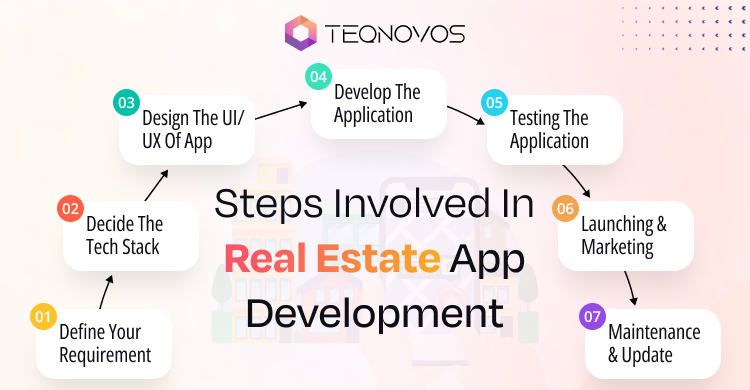
Define Your Requirements
Start your real estate app development by identifying the main objective. Are you building an app for buyers, sellers, or mainly investors? Begin your app development by understanding the target audience. Choose the app features and functionalities suitable for the audience.
Conduct complete research on the market to identify any gaps. Once done, decide on the features of the application. Common features include property search, filtering options, virtual tours, and saved listings. It will help you decide on the features necessary for app integration.
Clear requirements also support smoother custom real estate app development when the project moves into design and coding.
Decide The Tech Stack
Next, decide on the real estate app development company to create your application. The team can help choose the right tech stack for the app. This choice depends on the target platform. The app may need iOS development, Android development, or both. Businesses can also choose cross platform development to build one app for multiple platforms.
The tech stack includes selecting programming languages, web servers, and backend server integration. It also includes user interface tools for testing and debugging, among other frameworks.
Design UI/UX
A clear user interface and user experience design are essential for user satisfaction. User interface is the visual layout users interact with. User experience covers how easily users move through the app and complete actions. A few steps can help create an effective real estate app.
- First, understand the target audience and their preferences.
- Map out how users will move through the app.
- Prepare layouts for key screens to visualise the app structure.
- Create an interactive prototype to test user actions and gather feedback.
Develop The Application
This is the step where real work starts. The real estate app development company will hire a developer to write the code based on the decided design. The team integrates front-end and back-end functions. This is a smart choice if you start with a minimum viable product. It helps you get user feedback before the launch of the application.
At this stage, businesses may also hire real estate app developers to manage complex features and integrations. These may include CRM integration, payment tracking, document upload, mortgage calculator, or map integration. The process of custom real estate app development must stay flexible and scalable to support future growth.
Testing The Application
After developing the app and making sure it works, it is important to do thorough testing. This helps ensure that the app performs as expected.
The testing process can include strategy planning, manual testing, automated testing, performance testing, security testing, and usability testing.
Launching & Marketing
Finally, launch the real estate app after final testing and approval. Review each app store guideline before submission. This helps avoid delays and supports a smoother launch. Legal compliance also matters. It should cover data protection, privacy rules, and platform requirements to reduce the risk of rejection or legal issues.
Maintenance & Update
Once you launch your application, maintain it on a daily basis. Having a dedicated team ensures that the application remains functional and relevant.
- Regularly update content and its features.
- Monitor the application performance metrics.
- Ensure its compliance with rules and regulations.
- Gather important feedback for improvements.
Real estate apps also face challenges related to user demand, market changes, and feature planning. You can explore these points in detail in this guide on real estate mobile app development challenges and opportunities.
Create Smarter Property Experiences —Plan real estate app features built for growth
Schedule a CallReal Estate App Development Cost
The cost of real estate app development depends on platform selection, feature complexity, integrations, design requirements, and development team location. Below is an approximate cost range based on current market standards.
| App Type | Estimated Development Cost |
| Basic Listing App | $20,000–$50,000 |
| Rental Platform | $30,000–$70,000 |
| Property Marketplace | $60,000–$180,000+ |
| Enterprise Property Management Platform | $100,000–$250,000+ |
Mistakes To Avoid During Real Estate App Development
The real estate industry offers various innovative opportunities for real estate application development. But just because you have a mobile application does not mean your business will increase in an instant. You must be careful during the development stage. Here is the list of mistakes to avoid during real estate app development.
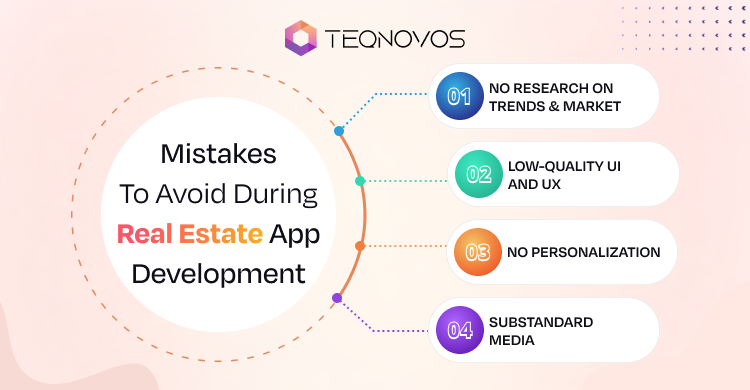
No Research On Trends & Market
Skipping proper market research is a major mistake. Real estate app development should not depend on guesswork about user needs. Incorrect assumptions can create a bad feature set and user experience.
Market research allows companies to understand the current trends and their competitors. This also allows realistic goals to be set for the application. With clear research, businesses can choose the right features and avoid unnecessary functions. On this basis, create a profile of your ideal users and ensure that your app meets their specific requirements.
Low-Quality UI And UX
A poor real estate app development design can prevent users from engaging with the application. It can frustrate users and make them less likely to recommend the app.
The best way to design a successful application is to adopt a minimal design with a creative and easy to use interface.
Plan the design around the user perspective. Keep navigation simple and make each action easy to complete. A hamburger menu can help users access services without cluttering the screen. This creates a cleaner interface and improves user satisfaction.
No Personalization
Today’s tech world requires personalization. Without personalization, app services can feel less useful. Users usually look for applications that offer tailored property suggestions based on searches and relevant property interests. It fosters loyalty and encourages repeat visits.
Substandard Media
If your real estate application sees low traffic and poor engagement with property listings, this could be because of poor quality media used in the app.
Usually, people like to engage with content that displays full details of properties. Strong images, videos, and virtual tours can make your application more useful and engaging.
This section highlights a few common issues. For a more detailed breakdown, you can also read this guide on real estate application development mistakes to avoid.
Conclusion
Real estate app development needs careful planning and a clear understanding of business goals. A real estate app can help property businesses improve visibility, manage leads, and support smoother communication between users and agents. Search filters, map views, virtual tours, CRM integration, analytics, and secure payment flows can all improve user experience and business control.
Connect with Teqnovos, a real estate app development company for high quality solutions. Benefit from dedicated support throughout the development process.
Get in touch right now to prepare to tackle the real estate market uniquely.