






















How Is Artificial Intelligence Revamping UX And Product Design
Imagine navigating a site that already knows what you want before you even click. Picture products that transform into habits. That is the power AI now brings to UX and product design. AI no longer sits behind the curtain. It is stepping into the spotlight.
Every day, tools are becoming smarter. They learn from user clicks and adapt to individual preferences. AI for UI/UX design helps teams turn these patterns into clearer journeys and faster design decisions. They help designers predict problems before they appear. This means faster prototypes and fewer revisions while giving teams more time for creativity.
Designers today do more than pattern-matching. They shape experiences that feel personal and intuitive and alive. In a world crowded with digital noise, AI lets designers make a difference that users feel.
In this post, we explore how AI for UI/UX design is revamping UI and UX services from the ground up. We will dive into real shifts, big benefits, and tough challenges. Let’s see what the future of design looks like when human creativity meets machines.
The Growing Role Of AI In UX and Product Design
Artificial intelligence is no longer a background feature in design. It has become a central force that shapes how users connect with digital products. AI for UI/UX design now supports more personal interactions and more relevant recommendations. The result is smarter and more inclusive UX design.
Before exploring the role of AI, it helps to understand how UI and UX support different parts of a digital product. Read our guide on UX vs UI design in software development to learn how each discipline shapes the final experience.
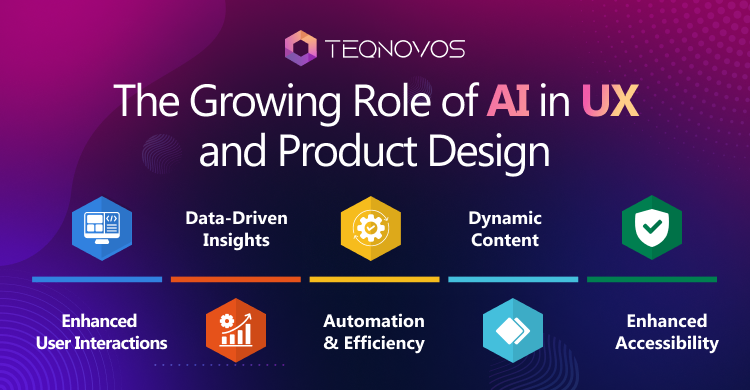
1. Enhanced User Interactions
User interactions with products and services have entirely changed with AI. Virtual assistants and chatbots are there to help users by responding almost instantly. This creates more natural conversations and makes interfaces feel more human.
2. Data-Driven Insights
Instead of being dependent only on conjectures, designers can use AI tools in UX design. This helps them analyze behavior patterns and feedback at scale. The data helps uncover what users need and supports more confident design decisions.
3. Automation & Efficiency
AI can automate tasks such as resizing images and running usability tests. This gives teams more time to focus on creativity and solving complex problems.
4. Dynamic Content
AI adapts digital experiences in real time. Interfaces adjust, product suggestions shift, and messaging becomes more personal. This helps keep users engaged and reduces friction.
5. Enhanced Accessibility
AI tools for product design can make digital products easier to use for people with different needs. This makes inclusivity a practical part of the design process. Speech recognition and automated image descriptions are two useful examples.
How To Integrate AI Seamlessly In UX and Product Design
Integrating AI in product design is not just about fancy features. It is about using intelligence to make products more useful and intuitive. Designers need to approach AI as a partner in solving real and complex user problems.
1. Address User Needs
Every integration should start with people and not the technology. Before implementing any third-party product in your application, you need to know the issues faced by the user. It should be ensured that the AI is capable of understanding the user’s problem and providing them with appropriate solutions.
2. Leverage AI for Research
AI in UX design can process large volumes of research data and user feedback. These insights help reveal patterns. The design team can then rely on relevant evidence instead of guesswork.
3. Accelerate Design & Ideation
A generative AI development company can improve the user experience by suggesting layouts and creating design variations for testing. This speeds up the thinking and reduces the time spent on prototypes.
4. Tailored Experiences
AI enables personalization at scale. Adaptive interfaces and custom recommendations can make each experience feel unique without adding more manual work.
5. Monitor and Improve
AI requires continuous monitoring rather than a one-time setup. Every app needs continuous monitoring and refinements over time. Upgrading features and tools helps systems to adapt to changing user behaviors. It assists in delivering consistent value.
6. Prioritize Data Ethics
An ethical designer protects the user’s privacy and enlightens users on how the AI part works. Ethical use of AI can help build user trust and create successful businesses.
Practical Standards for AI-Powered Design Workflows
Teams need clear standards before they use AI to create interfaces or prototypes. These standards should protect user needs and design quality while keeping the workflow efficient. Businesses can also use AI software development services when a product needs custom intelligence or deeper system integration.
Best Practices for AI-Powered UI/UX Prototype Generators
The best practices for AI-powered UI/UX prototype generators start with a clear user problem and a defined prototype goal. Teams should provide accurate context and design rules before asking a tool to generate screens or flows.
The best practices for AI-powered UI/UX prototype generators also require human review before a concept reaches users. Designers should check accessibility, navigation, and content clarity in every generated variation.
Following the best practices for AI-powered UI/UX prototype generators helps teams move faster without treating generated output as a finished design. The best practices for AI-powered UI/UX prototype generators should also include user testing before development begins.
AI First UI UX Design Principles Best Practices
AI first UI UX design principles best practices should begin with real user needs and clear product goals. Each AI feature must support a specific task and improve the user journey.
Teams should explain when AI shapes an interface and how it uses user data. Clear guidance gives users more control and builds trust.
Designers should also provide manual options when automation fails. Strong AI first UI UX design principles and best practices protect accessibility and privacy from the earliest design stage.
AI in UX/UI Design Best Practices for Developers
AI in UX/UI design best practices for developers should begin with clear data rules and predictable system behavior. Developers must know what data enters the system and how each response appears in the interface.
Teams should create clear loading states and error messages before launch. They should also provide fallback options when an AI feature takes longer or cannot complete a task.
Developers must test each feature across devices and user roles. AI in UX/UI design best practices for developers should also guide release reviews as the product continues to evolve.
Unlocking the Benefits of AI in UX and Product Design
AI is driving meaningful changes in product design, research, and service delivery. The benefits of AI in designing are vast. It spans across workflows, insights, and business growth. Below are the key advantages it offers for users, designer teams, and businesses.
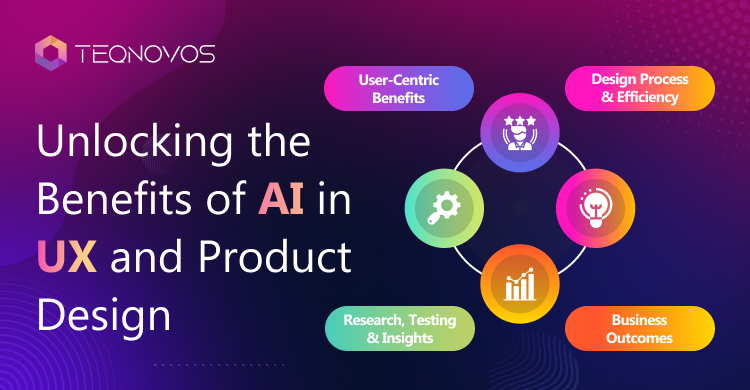
1. User-Centric Benefits
- Improved UX: Streamlined interactions help create smooth interfaces and intuitive navigation.
- Personalization: Content layouts and product suggestions adapt to the user’s demands. Thus making experiences feel more unique.
- Accessibility: Get inclusive tools for users with unique needs with AI tools in UX design.
- Enhanced User Engagement: Personalized and responsive interactions keep users engaged. It increases retention and user satisfaction.
2. Design Process & Efficiency
- Optimized Design: Detailed insight into data helps make better design choices and mitigates uncertainty.
- Automated Tasks: AI can handle tiresome tasks such as formatting or tagging. Hence saving user time.
- Rapid Prototyping: Generative tools help teams to build and test many variations of design.
- Smarter Copywriting: AI suggests headlines and call-to-action to interest the users. Aligning with user intent helps gain an audience.
3. Research, Testing, and Insights
- Insightful Testing: Helps in predicting user behavior and demands. Thus making changes in the design format.
- User Research: Analysis of large data quickly helps in revealing user behavior faster.
- Sentiment Analysis: Discovery of emotional reactions in feedback helps adjust the tone of the chatbot.
- Optimized Testing: Usability and other tests run faster. This yields more reliable insights.
4. Business Outcomes
- Increased Efficiency: Improving workflows lowers the price but speeds the process of development and delivery.
- Business Outcomes: Better UX design in AI products can build loyalty and support stronger conversions and customer lifetime value.
- Strategic Advantage: AI is helping companies with creative and innovative solutions.
Small businesses can use thoughtful interface design to improve engagement and support digital growth. Explore the benefits of UI/UX design services for small businesses to see how stronger design can improve customer experiences.
The Challenges of Bringing AI into the Design Process
Designing the product is an important aspect of product creation and user perception. The emerging AI tools can help improve product design, but at the same time, it poses certain threats that must be handled before they pose any problem for the users.
1. Ethical Concerns
The introduction of any new tool always has various effects on different people. Even though there are many good AI products for designing, they may exclude certain individuals due to either the nature of the data used to train the product or its interface.
2. Skill Gaps
Not every developer or designer has the knowledge needed to use AI for UX design effectively. This can slow development and create inconsistent results. Proper training and a supportive environment can help teams adopt the technology with more confidence.
3. System Constraints
Traditional systems do not always support new AI tools. Integration may require updates to existing processes and active software. This work can take time and may create added pressure for design and development teams. The challenge becomes greater when older systems cannot exchange data reliably with new tools.
4. Cultural Hurdles
Introducing new tools or services can create resistance. Team members may worry that AI tools in UX design will limit creativity or replace part of their role. Clear communication can reduce this concern. Training should show how the tools support human decisions rather than replace them.
5. Solutions & Best Practices
Teams can reduce these challenges through open communication and practical training. Everyone should have access to the resources needed to use the tools safely. Peer collaboration can also help teams solve problems faster. Understanding how AI tools work in UX design makes adoption easier and more consistent.
Conclusion
Artificial intelligence is remodeling services and the user experience. This technology has moved beyond early research and now helps designers build more responsive interfaces. It goes on satisfying the rising consumer demands. Instead of spending hours on monotonous steps, teams can rely on AI to handle the technical stuff. This shift makes room for ideas that feel more thoughtful and practical for real users.
What makes AI powerful in design is its ability to adapt. Interfaces have the power to respond to behavior in real time. AI suggestions almost feel relevant, and its accessibility features ensure everyone feels equal. Still, bringing AI into design is not free of challenges. It calls for constant refinement and support for teams learning new skills.
By blending human imagination with intelligent systems, designers can create advanced products. These feel more personal and engaging than ever. The future of UX will belong to teams who treat AI as a creative partner.
Businesses that use AI for UI/UX design today can build stronger standards for tomorrow. Connect with Teqnovos to outsource UI/UX design services or hire AI developers for a custom product. Get a free consultation quote today.