
























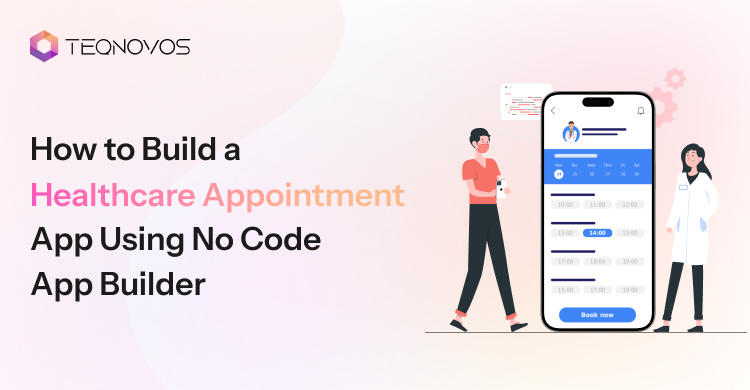
How to Build a Healthcare Appointment App Using No Code App Builder
For clinics and healthcare startups, appointment booking is not just an admin task. It controls patient intake and daily revenue. Every unanswered call can leave a paid slot empty. Every manual schedule change can increase staff pressure. Even a delayed confirmation can send a patient to another provider.
This is why healthcare businesses need a faster way to build appointment systems that support real clinic workflows. A no code app builder helps teams create a platform without starting with a full custom build. It gives businesses a faster way to test demand and reduce front desk dependency.
Still, the app needs more than screens. It needs clear booking logic, secure patient data, and the right structure for future growth. This blog explains how healthcare businesses can build a strong appointment app with no code and where expert support can make the product safer and more scalable.
What Is a Healthcare Appointment App?
A healthcare appointment app helps patients book medical visits through a mobile or web platform. It allows users to create profiles, search for doctors, check available slots, and confirm appointments in a few steps.
For clinics, it works as an appointment booking app with better schedule control. Staff can manage doctor availability, booking requests, cancellations, reminders, and patient updates from one dashboard. This reduces manual calls and helps clinics keep appointment flow clear.
Why Healthcare Businesses Use No Code for Appointment Apps
Clinics need faster ways to manage patient access without adding more pressure on staff. No code helps them launch booking workflows faster and improve them with real user feedback.
1. Faster Launch
A no code app builder helps healthcare businesses move from idea to working app faster. Teams can build patient forms, doctor schedules, booking screens, and admin panels without waiting for a full custom build. This helps clinics test demand and improve patient access early.
2. Lower Effort
No code reduces early development pressure. It allows businesses to validate the booking flow before investing in a larger product. This gives decision makers more control over the budget timeline and product direction.
3. Easy Updates
A trusted no code app development company can help design booking flows that match real clinic operations. This includes patient sign up slot selection, doctor availability, cancellation rules reminders, and admin access.
4. User Roles
A healthcare app builder works best when every user role has a clear purpose. Patients need easy booking. Doctors need schedule visibility. Admin teams need control over change approvals and reminders. A well planned structure keeps the app easier to manage.
5. Growth Ready
No code can support early healthcare app development when the product has the right foundation. Healthcare businesses can start with a lean version and expand later with custom features and stronger compliance workflows.
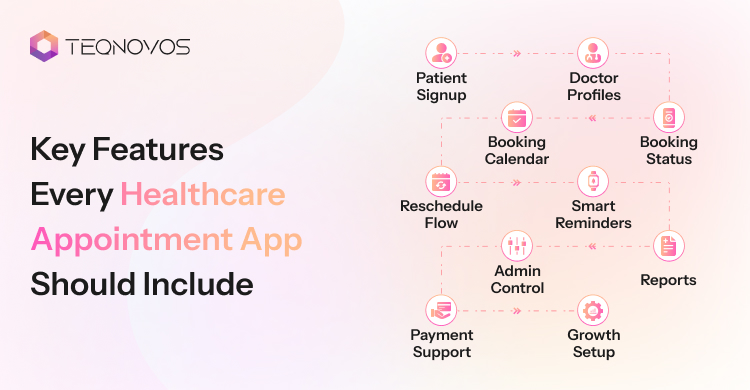
Key Features Every Healthcare Appointment App Should Include
A strong healthcare appointment app needs more than a booking screen. It supports patient access, clinic operations, and future growth. Healthcare businesses need features that reduce manual work and protect appointment revenue. This is why feature planning matters before development starts.
1. Patient Signup
Collect useful details without slowing the user. The flow can include contact details and basic health information. This helps clinic teams prepare before the visit and reduce repeated questions.
- Keep forms short and clear
- Collect only useful patient details
- Support faster patient intake
- Reduce front desk workload
2. Doctor Profiles
Allow patients to choose the right provider faster. Each profile shows specialization consultation hours and available slots. For healthcare businesses, this builds trust before booking and makes the patient journey more direct.
- Show doctor expertise clearly
- Add consultation hours
- Display available slots
- Build patient trust early
3. Booking Calendar
The calendar is the core of an appointment booking app. It should match the doctor’s availability and admin rules. A well planned healthcare appointment booking app helps reduce double bookings and schedule confusion.
- Show real time availability
- Block booked slots quickly
- Reduce schedule errors
- Improve doctor time usage
4. Booking Status
Clear booking status keeps patients and staff aligned. The app can show pending, confirmed, cancelled, or rescheduled appointments. This reduces follow up calls and gives clinics better control over daily patient flow.
- Show each booking stage
- Reduce patient confusion
- Help staff track changes
- Improve daily clinic planning
5. Reschedule Flow
Patients often need to change visit times. A clear reschedule flow helps them update appointments without calling the clinic. It also helps staff avoid manual changes and missed updates. For healthcare businesses, this keeps the booking system cleaner.
- Let patients change slots
- Update staff instantly
- Reduce manual call handling
- Keep booking records clean
6. Smart Reminders
Notifications and reminders save the doctor’s time. The app can send alerts for upcoming visits, schedule changes, and cancellations. This helps healthcare businesses reduce no shows and improve patient retention.
- Send visit alerts
- Notify schedule changes
- Reduce missed appointments
- Support better patient return
7. Admin Control
Assist clinic teams in one place to manage daily booking operations. Staff can update doctor schedules and handle cancellations. This feature becomes important when the business manages multiple doctor departments or branches.
- Manage schedules in one place
- Control booking approvals
- Handle cancellations faster
- Support multi branch operations
8. Reports
Enable healthcare businesses to understand booking performance. The dashboard can show booked slots, cancelled visits, missed appointments, and doctor availability. This helps owners improve staff planning and make better growth decisions.
- Track booked appointments
- Review cancelled visits
- Monitor doctor availability
- Plan clinic growth better
9. Payment Support
Support clinics collect consultation fees, booking charges, or advance payments. This can reduce last minute drop offs and make the booking flow more complete. It also gives businesses better control over paid appointments.
- Collect booking fees
- Support advance payments
- Reduce last minute drop offs
- Improve revenue control
10. Growth Setup
The feature set should support future scale. The app may later need patient records or clinic management tools. A flexible structure makes healthcare mobile app development easier when the business adds more doctor locations or advanced workflows.
- Plan for future features
- Support more doctors
- Add new locations easily
- Keep workflows scalable
How to Build a Healthcare Appointment App Using No Code App Builder
Building an appointment app needs more than screen design. Healthcare businesses need a clear product plan before the first workflow is created. The goal is to reduce booking friction and protect staff time. A no code app builder can support this faster when the structure is planned with real clinic operations in mind.
Step 1: Booking Flow
The booking flow should show how patients move from search to confirmation. Patients may search by doctor service location or available slot. The flow should also include reschedule and cancellation paths. This helps the software team build a system that matches real patient behavior and clinic rules.
Step 2: App Structure
The app needs separate areas for patients and doctors. Patients need easy booking access. Doctors need schedule visibility. Admin teams need control over slots and changes. A strong structure helps healthcare businesses avoid confusion after launch and keeps the app easier to scale.
Step 3: User Roles
This defines what each person can see and manage. Patients can book or update visits. Doctors can view schedules and appointment details. Admins can approve bookings and manage calendars. This step is important in doctor appointment app development because access control affects workflow and data safety.
Step 4: Appointment Data
The database should store patient details, doctor availability and payment updates. This data must stay organized from the start. Poor data planning can create booking errors later. A software development team can map these fields early so the app stays reliable as bookings increase.
Step 5: User Interface
The app design should help patients book with fewer steps. Each screen should have a clear purpose. The flow should not overload users with long forms or unclear choices. A healthcare app builder can speed up interface creation, but the design still needs strong product thinking. This helps clinics improve patient completion rates.
Step 6: Notifications
Instant alerts keep patients and clinic teams informed. The app can send booking confirmations and cancellation updates. These alerts reduce manual follow ups and help protect appointment slots. For healthcare businesses, this can improve staff efficiency and reduce missed visits.
Step 7: Booking Tests
Testing should cover every real booking situation. The team should test new appointments, cancelled visits, rescheduled slots, and admin updates. This helps catch workflow gaps before patients use the app. A no code app builder can support quick testing, but expert review makes the launch safer and more business ready.
The best appointment apps start with clear logic and not just quick screens. Healthcare businesses that plan workflows and testing early can launch faster and avoid costly fixes later.
Launch a Secure Healthcare Booking App Faster —Talk to our Expert Today!
Schedule a CallHow to Protect Patient Data in a Healthcare Appointment App
Security and patient data protection keep a healthcare appointment app safe for patients and stable for businesses. The app needs secure login role control and access tracking before launch. This makes healthcare app development more reliable and helps healthcare businesses protect patient trust.
Why Security Matters
Healthcare businesses collect patient profiles and contact details. A weak setup can create trust gaps and compliance risks. A strong security plan helps the software team build safer workflows before real users enter the platform.
What the App Needs
The app needs a secure structure that protects every user action. This includes patient login, doctor access, admin control, and booking updates. Each part must support safe data handling and clear access rules.
Security Checklist
- Secure login for patients, doctors, and admins
- Role based access for different user types
- Safe storage for patient and booking data
- Privacy checks based on the target market
- Access tracking for admin actions
- Regular testing before launch
Development Focus
A software development team needs to plan security at the product level. It cannot stay limited to password setup. The team needs to map data flow and admin permissions. Strong planning for healthcare app data privacy helps businesses avoid costly changes after launch.
Business Impact
Better security supports patient confidence and product growth. It also helps healthcare businesses prepare for future features such as patient records and clinic system integrations. This makes healthcare mobile app development safer and easier to scale.
How to Validate a Healthcare Appointment App Before Launch
Testing gives healthcare businesses a safer launch path. It helps the software team find booking gaps before patients use the platform. A strong review also protects doctor time and daily clinic operations.
- Booking Flow: Validate the full journey from doctor search to final confirmation. The team checks slot selection and cancellation steps. This helps remove friction before the app reaches real users.
Business value: It reduces drop offs and improves appointment completion.
- User Access: Confirm the access for patients and admins. Each user type needs the right screen and the right action control. This keeps booking activity clear and protects private information.
Business value: It reduces internal errors and keeps workflows safer.
- Slot Accuracy: Review doctor schedules across all available days and locations. The system must show open slots and booked slots instantly. This step matters in doctor appointment app development because one wrong slot can affect patient trust.
Business value: It protects doctor availability and reduces double bookings.
- Admin Actions: Test how staff manage approvals, schedule edits, cancellations, and patient requests. Admin testing helps the clinic team handle daily changes without manual confusion.
Business value: It lowers front desk pressure and improves staff control.
- Mobile Experience: Check the app on different screen sizes. Patients often book appointments through mobile devices. A reliable healthcare app builder setup needs clear forms and simple actions.
Business value: It improves patient experience and supports more completed bookings.
- Expert Review: A healthcare business can hire no code developers to review booking logic and admin control before launch. This adds a software quality layer before real patients use the app.
Business value: It helps the business launch with fewer risks and stronger product stability.
When Healthcare Businesses Need Expert Support
No code helps healthcare businesses launch faster. Expert support becomes important when the app needs secure workflows and long term scale. A software partner can turn a simple booking idea into a reliable product that supports real clinic operations.
1. Complex Workflows
Expert support helps when the booking flow goes beyond basic slot selection. The app may need doctor approvals, branch based calendars, and custom cancellation rules. At this stage, healthcare businesses can hire healthcare app developers to map these workflows before development starts.
2. Secure Compliance
Healthcare products handle sensitive patient data. The software team needs to plan access control, data storage, and audit actions. This makes healthcare app development safer and more stable after launch.
3. Advanced Integrations
A growing clinic may need payment gateways or clinic management tools. These integrations need clean data flow and proper testing. Expert support helps connect systems without breaking the booking experience.
4. Data Migration
Some healthcare businesses already use spreadsheets or older clinic software. A development team can move useful data into the new app with a better structure. This helps teams avoid lost records and messy workflows.
5. Multi Branch Scale
A single clinic may start with basic booking. A growing healthcare brand may need location based schedules and admin control across branches. This is where healthcare mobile app development needs stronger planning.
Better doctor appointment app development starts with expert planning. It helps healthcare businesses reduce booking errors and prepare the product for real clinic use.
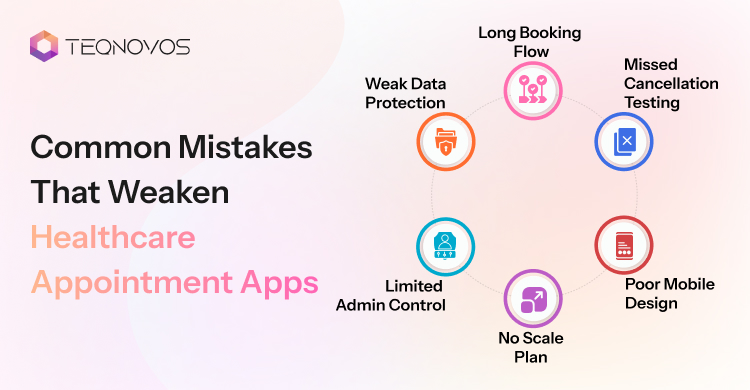
Common Mistakes That Weaken Healthcare Appointment Apps
Even a fast build can fail when the product lacks clear planning. Healthcare businesses need to avoid mistakes that affect bookings and daily clinic operations. A no code app builder can speed up development, but the app still needs strong workflow logic and a business focused structure.
1. Long Booking Flow
Remove extra steps from the booking journey. Patients may drop off when the app asks too many questions before slot selection. A shorter flow helps users find doctors and confirm visits faster.
- Keep forms short
- Reduce unnecessary screens
- Show available slots early
- Make confirmation simple
2. Weak Data Protection
Protect patient details from the first build stage. A weak security setup can damage trust and create compliance risk. Strong access control and safe data handling help the app support real healthcare operations.
- Add secure login
- Limit user access
- Protect patient records
- Review privacy rules
3. Missed Cancellation Testing
Test cancellation and reschedule flows before launch. These actions happen often in clinic operations. Poor testing can create open slot errors and staff confusion.
- Test cancelled bookings
- Check reschedule alerts
- Update slots instantly
- Avoid manual confusion
4. Poor Mobile Design
Build every screen for mobile users. Patients often book visits through phones. Small buttons, slow forms, and unclear layouts can reduce appointment completion.
- Use clear buttons
- Keep screens clean
- Speed up page flow
- Test on real devices
5. Limited Admin Control
Give clinic teams clear control over schedules and slot changes. Without admin control, staff may depend on manual fixes. This can increase workload and booking errors.
- Manage doctor schedules
- Approve booking changes
- Control slot visibility
- Track daily updates
6. No Scale Plan
Plan for future growth early. The app may later need more doctors, branches, reports, payments, or integrations. A flexible structure helps healthcare businesses expand without rebuilding the whole system.
- Support more locations
- Add future features
- Plan data structure
- Keep workflows flexible
Build a Scalable Appointment App for Your Clinic —Schedule a Free Consultation!
Schedule a Call
Conclusion
A healthcare appointment app can help healthcare businesses improve patient access and reduce pressure on clinic teams. It gives patients a faster way to book visits and gives staff better control over schedules. This creates a smoother booking flow and supports stronger daily operations.
No code can make the first launch faster. But a successful product still needs clear workflow planning and a structure that supports future growth. Healthcare businesses gain more value when the app fits real clinic processes instead of only offering basic booking screens.
With the right software strategy, businesses can start lean and improve the product over time. This helps them reduce manual labor and build a better digital experience for patients.