





















Create a Property Listing Platform Using a No Code Builder
Property search has moved far beyond window displays and phone calls. Buyers and investors now expect simple online access to listings. They want clear images. They want quick filters. They want fast inquiry options. Real estate teams also need better ways to manage listings and capture leads.
A no code builder gives agencies and property managers a faster way to launch. It helps them create listing pages and basic workflows without building everything from scratch. This makes it easier to test an idea before moving into a large custom project.
This guide explains how to create a property listing platform using no code tools. It covers core features and the point where expert development support can help the platform grow.
Can a Property Listing Platform Be Built Without Coding?
Yes. A basic property listing platform can be built without coding. A no code real estate app can include property listings, search filters, and an admin dashboard.
A real estate app without coding works well for agencies and property managers that want to test an idea fast. It can help teams launch a simple platform first. Later, they can add custom features when the platform needs security, automation, or advanced user flows.
This approach gives real estate businesses a practical starting point. It reduces early technical work. This enables teams to understand what users need before they invest in full custom development.
What Is a Property Listing Platform?
A property listing platform is a digital space that helps users find real estate options in one place. It can show homes, rentals, offices, land, or commercial properties. Users can check the images of the property along with its price. They can also view the location, size, and features.
What Users Can Do on a Property Listing Platform
Users can search properties by location. They can filter listings by budget type and features required. Customers can view the property images and other details. They also have an option to save the listings and send inquiries to agents or owners.
How It Helps Real Estate Teams
A property listing website helps real estate teams manage listings with less manual work. Admins can add new properties. Agents can update listing details. Teams can track inquiries and manage leads from one dashboard.
Who Can Use It
Real estate agencies can use it to display active listings. Brokers can use it to collect qualified leads. Property managers can use it to organize rental units. Real estate startups can use it to test a new marketplace idea.
Launch a No Code Property Platform With Expert Support —Start Your Project Today!
Schedule a Call
Why Real Estate Businesses Use No Code Builders
Real estate teams need speed and control. A no code builder gives them a simpler way to launch digital property tools without a long build cycle. Agencies and startups can build a property listing platform with core features first. They can improve it after real users start engaging with the platform.
1. Faster Launch
Real estate moves quickly. New listings appear often. Buyer demand can change within days. A no code setup allows teams to publish listing pages and basic dashboards faster than a full custom build.
The MVP does not need every advanced feature. It only needs a clean user journey and useful property data. That gives the business a real platform to test.
2. Lower Cost
A full custom product may need a higher budget at the start. A no code builder reduces early cost because many layout workflows and database features already exist inside the tool.
Real estate businesses can start with the most important features. They can add advanced search or mobile features later.
3. Easy Updates
Property platforms need regular changes. Teams may need to update prices or listing fields. A no code setup makes these updates easier for daily work.
This gives internal teams more control over content and basic workflows. It also reduces delays for small platform changes.
4. Market Testing
A no code real estate app works well for early validation. Teams can test how users search. They can see which listings get more inquiries. They can track where users leave the platform.
These insights guide better product decisions. The business can avoid extra features that users do not need.
5. Expert Support
No code does not mean no planning. A platform still needs the right structure and testing. Businesses that want a cleaner launch can work with a team that offers no code app development services for design workflow planning and platform support.
6. Growth Ready
A no code platform can start small. It can grow with more listings and workflows. When the platform needs stronger security or advanced mobile features, custom development can support the next stage.
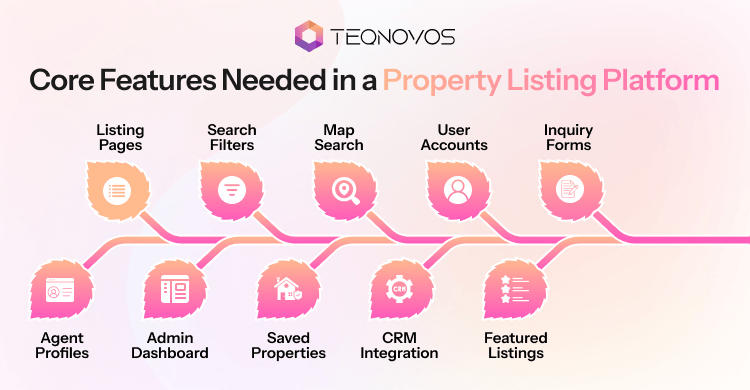
Core Features Needed in a Property Listing Platform
A strong property listing app needs clear features that support both users and real estate teams. Users need a fast search. Agents need better lead flow. Admins need control over listings and platform activity. A smart feature plan also prevents the platform from becoming too complex at launch.
1. Listing Pages
Listing pages are the base of the platform. Each page should give users enough detail to decide if the property fits their needs. Clear content also improves trust and leads users toward action.
- Add clear property images
- Show price, location, and size
- Mention rooms, features, and property type
- Add inquiry call and visit options
2. Search Filters
Assists users in reaching the right property faster. A real estate app builder should support filters that match real search behavior. Simple filters can improve the user journey and reduce poor quality inquiries.
- Add location based search
- Include budget filters
- Add property type options
- Use room size and feature filters
3. Map Search
Map search gives users better location clarity. Many users want to compare nearby areas before they contact an agent. A map view can make the platform more useful for serious buyers and renters.
- Show the property location clearly
- Add nearby area details
- Support distance based search
- Improve trust before inquiry
4. User Accounts
User accounts create a more personal experience. Buyers and renters can save properties. Agents can manage listings. Admins can control users and activity from one place.
- Add buyer and renter accounts
- Add agent login access
- Allow saved property lists
- Give admins full user control
5. Inquiry Forms
Turn your app visitors into leads. The form should be short and easy to complete. Real estate teams can use these leads for calls and follow ups.
- Ask for basic contact details
- Add a property interest field
- Include visit request options
- Send alerts to agents
6. Agent Profiles
Agent profiles build confidence. Users often want to know who handles the property before they make contact. A clear profile can improve trust and response rates.
- Show agent name and photo
- Add contact details
- Display active listings
- Mention service areas
7. Admin Dashboard
The dashboard keeps the platform organized. It gives teams control over listing, users’ inquiries, and content. It also supports cleaner workflows for agencies and property managers.
- Approve new listings
- Edit property details
- Manage users and agents
- Track inquiries in one place
8. Saved Properties
Keep your users engaged through this feature. Buyers and renters often compare many options before making a decision. This feature allows them to return and review their shortlist.
- Let users save listings
- Allow easy comparison
- Support repeat visits
- Track popular properties
9. CRM Integration
CRM means customer relationship management. It helps real estate teams manage leads and follow ups. A platform can connect with CRM tools so agents can respond faster and avoid missed inquiries.
- Store inquiry details
- Assign leads to agents
- Track follow up status
- Improve lead response time
10. Featured Listings
Featured listings can support revenue once the platform gets traffic. Agents or owners can promote selected properties for better visibility. This feature should stay simple during the first launch.
- Highlight selected properties
- Offer paid visibility
- Support agent plans
- Create a monetization option
Read our blog on key features in real estate app development to support your feature planning before the launch.
Best No Code Builder Options for Property Listing Platforms
The right no code builder depends on the platform’s goals. A simple directory needs a different setup than a full marketplace. A mobile focused property listing website may also need a different tool than a web based listing portal. Real estate teams should compare each option based on features and future growth.
1. Bubble
Works well for platforms that need custom workflows. It can support user accounts and marketplace logic. The builder suits a real estate startup that wants more control over platform behavior.
A team can use Bubble when the platform needs agent logins and custom search flows. It may need more setup time than simpler tools. Thus, offers more flexibility for a complex real estate app builder use case.
2. Softr
Ideal for simple directory portals and listing websites. It connects with data sources and turns property records into clean user interfaces. Good fit when the platform mainly needs listing pages and member access.
A real estate agency can use Softr to launch a simple property portal faster. It can also work for internal listing tools and agent portals.
3. Glide
Glide works well for mobile first apps. Turn structured property data into a simple app experience. It suits teams that want agents or renters to access listings quickly from mobile devices.
This builder supports simple dashboards and user views. It may need extra planning if the business wants deep marketplace features or advanced map based workflows.
4. FlutterFlow
Useful when the mobile app experience matters more. Supports stronger app screens and app store focused projects. It is useful when the business wants a property app with a more polished mobile experience.
A team can use FlutterFlow for buyer apps or rental search apps. It may need more technical understanding than basic builders. It can be a better fit when the platform needs a stronger mobile design and future scaling.
5. Webflow
Webflow works well for polished property websites. Assists in content pages and search focused design when paired with the right tools. It is a good fit for agencies that want strong visuals and a clean website experience.
Webflow is useful when branding content and page design matter. It supports a listing style website with integrations. It may need other tools for advanced user accounts and complex property workflows.
Step By Step Guide to Create a Property Listing Platform
A clear build plan keeps the project focused. Real estate teams can create a property listing platform faster when each step has a clear role. The first version can stay simple. It can support listings search inquiries and admin control before advanced features are added.
Step 1: Define the Goal: The platform goal needs clarity before design begins. It may focus on rental listings. It may focus on property sales. It may also work as an agent directory or a full marketplace.
A rental platform may need availability dates and tenant inquiries. A sales platform may need agent profiles and visit requests. A marketplace may need owner accounts and payment options.
Step 2: Choose the Builder: The right no code builder depends on the platform type. A simple directory needs fewer workflows. The marketplace needs stronger user roles and better admin control.
Teams can compare each builder by design and pricing. This step can reduce tool limits later.
Step 3: Plan User Roles: A property platform may have buyers and admins. Each user type needs different access. Buyers may save listings and admins may approve users and control platform activity.
Step 4: Create the Database: The property database stores the main listing data. It can include title, price, location, property type, and status. Clean data makes search easier. It also keeps listing pages consistent across the platform.
Step 5: Build Listing Pages: Listing pages need to help users understand the property fast. Each page needs strong images and simple action buttons. A good listing page answers the main user questions before the user sends an inquiry.
Step 6: Add Search Filters: These assist users in finding relevant properties faster. The platform can include filters for location, price, and availability. Good filters reduce user effort. They also improve lead quality because users contact agents after finding a closer match.
Step 7: Set Forms: Inquiry forms turn visitors into leads. The form only needs useful details. A simple form can include a name and a message. Agent alerts can also improve response time.
Step 8: Add Admin: This control enables the team to manage listings and content. They keep the platform organized after launch. Admins can approve new listings. They can edit property details. They can remove outdated posts. They can also check inquiries from one place.
Step 9: Connect Tools: A property platform often needs useful integrations. These can include maps and payment tools. These tools improve daily workflows. They also give real estate teams better visibility into user activity and lead movement.
Step 10: Test Launch: The platform needs testing before it goes live. Mobile views and listing details need proper review. A soft launch can collect early feedback. The platform can improve later based on real user behavior.
Plan Your No Code Real Estate Platform With Experts —Speak with Our Experts!
Schedule a Call
How Much Does a No Code Property Listing Platform Cost?
The cost of a no code property listing platform depends on the scope. A simple listing website costs less than a full marketplace. The final budget changes with design features and support.
Cost Factors at a Glance
| Cost Factor | What It Means | Budget Impact |
| Platform type | Simple website or full marketplace | Medium to high |
| Design level | Template design or custom interface | Low to medium |
| Feature count | Listings search maps forms and dashboards | Medium to high |
| Builder plans | Paid no code tool subscriptions | Monthly cost |
| Integrations | CRM maps email analytics and payments | Medium |
| App publishing | Android and iOS launch support | Medium to high |
| Support | Updates, fixes, testing, and improvements | Ongoing cost |
Basic Platform
A basic property listing platform can include listing pages, search filters, and admin controls. This version works well for agencies and property managers who want to launch fast.
Best for:
- Real estate agency websites
- Rental listing websites
- Small broker platforms
- Early stage property portals
Advanced Platform
An advanced platform adds more user roles and stronger workflows. It may includes map search, CRM integration, featured listings, and payment options.
Best for:
- Real estate marketplaces
- Agent listing portals
- Rental management platforms
- Multi location property businesses
Support Costs
A property platform needs regular updates after launch. Listings change often. Forms need testing. User feedback may lead to new improvements.
Support can include:
- Bug fixes
- Listing updates
- Performance checks
- Feature changes
- Security reviews
Cost Planning Tip
A business can start with a simple version first. It can focus on listings search inquiries and admin control. Once the platform brings real users and leads, the team can invest in advanced features.
When Does No Code Need Custom Development Support?
No code works well for MVPs. It gives real estate teams a faster way to launch and basic user roles. Yet some platforms reach a stage where no code limits can slow growth.
Custom support becomes useful when the platform needs deeper or better mobile performance. At that stage, real estate app development can help the business move beyond a simple launch.
Complex Workflows: A growing platform may need advanced approval flows or custom lead routing. These workflows can become difficult to manage with basic no code tools. Custom development gives the platform more control over how users’ roles and actions connect.
Higher Speed: Platforms with more listings and filters become slower over time. Speed matters because users leave when pages take too long to load. Custom support improves database structure and page loading speed.
Stronger Security: Real estate platforms collect user details and agent information. A larger platform needs stronger access control and safer data handling. Custom development supports secure login and better privacy workflows.
Custom APIs: Enable two software systems to share data. A property platform may need a custom API for maps, payments, CRM tools, or property databases. Custom APIs can make the platform more flexible. They also reduce manual data work across connected tools.
Mobile Scaling: A web based no code platform can work well at the start. A business may later need a stronger mobile app for buyers or property managers. That stage may require real estate mobile app development for smoother screens and better mobile performance. Custom mobile app development offers a more scalable app experience.
Growth Planning: No code can support the first launch. Custom development can support the next stage. Real estate teams can get real estate app development services when the platform needs advanced workflows or custom integrations.
Practical Use Cases for a Property Listing Platform
A property listing website can support different real estate models. It can serve rental agencies and niche marketplaces. The right use case depends on the audience platform goal and lead flow.
1. Agency Website
Strong visibility gives agencies one clear place to present active listings. The platform can show property images and contact options. It can also create a smoother path from property search to inquiry.
- Display active sale and rental listings
- Add clear agent contact options
- Capture buyer and renter leads
- Track high interest properties
2. Rental Platform
Faster leasing gives rental teams a cleaner way to show available units. Users can view rent details and availability before sending an inquiry. This reduces manual back and forth for basic property questions.
- Show available rental units
- Add rent and availability details
- Collect tenant inquiries
- Update listing status faster
3. Agent Directory
Trusted profiles give users more confidence before they contact a property expert. An agent directory can show experienced service areas and direct contact options.
- Display agent profiles
- Show service areas
- List active properties
- Add direct contact buttons
4. Management Hub
Better control gives property teams one place to manage records and inquiries. A platform can also support property management software needs when rental workflows become more complex. Teams can get property management software development services to improve workflow management.
- Manage property records
- Track owner details
- Handle tenant inquiries
- Organize listing updates
5. Niche Marketplace
Focused growth works well for platforms that target one property category. A real estate marketplace app can serve luxury homes or vacation rentals. A clear niche can attract a more serious audience.
- Target one property segment
- Add focused search filters
- Build audience trust
- Support paid listing options
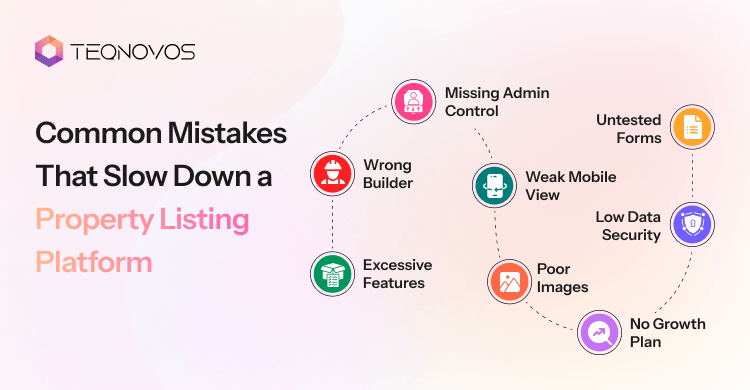
Common Mistakes That Slow Down a Property Listing Platform
Many real estate teams rush the first version. They add too many features before testing the core journey. A better plan makes it easier to create a property listing platform that users trust and manage.
1. Excessive Features
A crowded first version can confuse users. It can also slow down the build. The platform needs a clean start with only the most useful features.
Better approach:
- Start with listings
- Add search filters
- Add inquiry forms
- Add admin control
2. Wrong Builder
The wrong no code builder can create limits later. Some tools work well for simple directories. Other tools work better for complex workflows and user roles.
Better approach:
- Check user role needs
- Review database control
- Compare integration options
- Match the builder with growth goals
3. Weak Mobile View
Many users search for properties on mobile. A poor mobile view can reduce inquiries and trust. Every listing page needs a smooth mobile experience.
Better approach:
- Test mobile layouts
- Check image loading
- Review form flow
- Test search filters on mobile
4. Poor Images
Property images shape the first impression. Weak images can make a good listing look less valuable. Clear visuals can improve user interest.
Better approach:
- Use sharp images
- Keep the image order logical
- Show key rooms
- Add exterior views
5. Missing Admin Control
A platform needs strong control after launch. Without admin features, teams may struggle to update listings and inquiries.
Better approach:
- Add listing approval
- Allow quick edits
- Manage user access
- Track inquiry details
6. Untested Forms
Forms connect users with agents or property teams. A broken form can lose leads without warning. This mistake can hurt the full platform.
Better approach:
- Test every form
- Check email alerts
- Review required fields
- Confirm lead delivery
7. Low Data Security
A property platform collects user details and inquiry records. Weak access control can create risk for the business and users.
Better approach:
- Use secure login
- Add role-based access
- Protect lead data
- Review privacy settings
8. No Growth Plan
A platform can outgrow its first setup. Growth may bring more listings and workflows. Planning early can reduce rebuild work later.
Better approach:
- Plan CRM needs
- Consider map usage
- Review mobile goals
- Keep future workflows in mind
How to Choose the Right Development Support
A good development partner needs more than tool access. Real estate platforms need clear workflows and smooth user journeys. Before choosing a team, businesses need to review skill fit and scaling support.
1. Workflow Knowledge
Strong real estate workflow knowledge matters first. The team needs to understand listings agents and admins. It also needs to understand how leads move from inquiry to follow up. The right team can plan user roles and dashboard actions before the build starts. This creates a stronger base for the platform.
2. Builder Experience
No code tools work best when the team understands their limits. A skilled team can choose the right builder based on the platform goals. It can also plan the database forms and integrations with fewer rebuild issues. Businesses can hire no code developers for MVP planning and launch support.
3. UI and UX
UI/UX services matter in a property platform because users make quick decisions while browsing listings. The platform needs clear layouts and readable listing pages. A poor interface can reduce trust even when the property data is strong.
4. Integration Support
A property listing platform may need maps and calendars. CRM stores leads and follow up details. The development team needs to know how these tools connect with the platform. Clean integration planning reduces manual work and missed leads.
5. Mobile Experience
Many users search for properties on mobile. The team needs experience with mobile screens and responsive layouts.
A mobile focused platform also needs better image handling. It needs quick search access. It needs simple inquiry buttons that work smoothly on smaller screens.
6. Testing Process
Testing protects the launch. The team needs to test forms and lead delivery. A proper testing process can catch broken flows before users find them. This improves trust and reduces launch issues.
7. Scaling Support
A no code platform may start as an MVP. It is the simplest usable version that real users can test. The platform may later need custom features or more integrations. The right development support can guide this growth without forcing a full rebuild too early.
Conclusion
A real estate business does not need to start with a large custom platform. A no code builder can give the team a faster way to launch an MVP.
The platform can start with listings, search filters, and admin control. These features give users a clear property search journey. They also give teams a better way to manage leads and property data.
As the platform grows, the business can add stronger workflows and advanced security. This approach keeps the launch practical. It also creates room for long term growth.
Businesses that want to create a property listing platform can start small and improve with real user feedback. A focused property listing platform can attract better leads and support faster property discovery.