

























10 EHR Optimization Strategies for Better Healthcare Practices
EHR systems are shaping daily healthcare operations. Yet many practices still face slow documentation and repeated data entry. Poor system connections can delay access to patient information. Excessive alerts can also interrupt clinical work and reduce staff confidence.
These issues often continue even after an EHR has been used for years. The software may no longer match current workflows or staff roles. New tools may also create disconnected processes that increase workload instead of reducing it.
EHR optimization improves an existing system so it can support real clinical and operational needs. It strengthens workflow design and data quality. It also improves system integration and security. Staff training remains another key part of the process. The right EHR optimization strategies help healthcare leaders identify the real causes of delay and frustration.
Summary
This guide explains how healthcare practices improve an existing Electronic Health Record (EHR) system. It covers workflow reviews and data quality. It also explores system integrations and staff training. Healthcare leaders will learn how to build a clear EHR optimization plan and track meaningful results. The guide also explains when professional EHR optimization services may support more complex improvements.
Key Takeaways
- EHR optimization starts with a clear performance baseline.
- Workflow problems require practical process changes.
- Better data quality supports reporting and clinical decisions.
- Staff feedback helps teams find hidden system issues.
- Strong integrations reduce repeated work across platforms.
- Regular reviews keep the EHR aligned with practice needs.
What Does EHR Optimization Mean?
EHR optimization is the process of improving an existing Electronic Health Record system. The goal is to make the platform easier to use and better suited to current needs. Strong EHR optimization strategies improve clinical workflows and reduce repeated tasks. They can also strengthen data quality and system security.
The process may include template updates and access control reviews. It may also involve better system integrations and focused staff training. Some practices improve reporting tools or remove unnecessary alerts. Other practices clean old records and simplify documentation steps.
EHR implementation and EHR optimization serve different purposes. Implementation focuses on setting up and launching a new system. Optimization focuses on improving a system that already operates. It identifies performance gaps and corrects the causes. This approach helps the EHR support daily work instead of adding more complexity.
Why Healthcare Practices Need EHR Optimization
1. Workflow Pressure
An installed EHR can still slow daily work. Clinicians may spend too much time on documentation. Staff may enter the same information across several screens. Repeated steps increase workload and leave less time for patient care. Strong EHR optimization strategies remove unnecessary actions and simplify routine tasks.
2. Data Visibility
Disconnected healthcare systems often limit access to complete patient information. Teams may search through different platforms before they find the right record. Remote patient monitoring software development can help connect approved patient readings with existing EHR workflows. Better system connections create a clearer view of patient history and current care needs.
3. Staff Experience
Poor workflows can frustrate clinicians and administrative teams. Complex screens can slow task completion. Excessive alerts may also reduce attention and confidence. A well planned optimization process improves usability and supports stronger staff adoption.
4. Financial Performance
EHR issues can also affect billing and practice revenue. Missing details may delay claims. Incorrect records can create rework. Manual processes can increase operating costs. Better workflows support faster billing and more consistent financial management.
EHR Optimization Strategies That Improve Performance
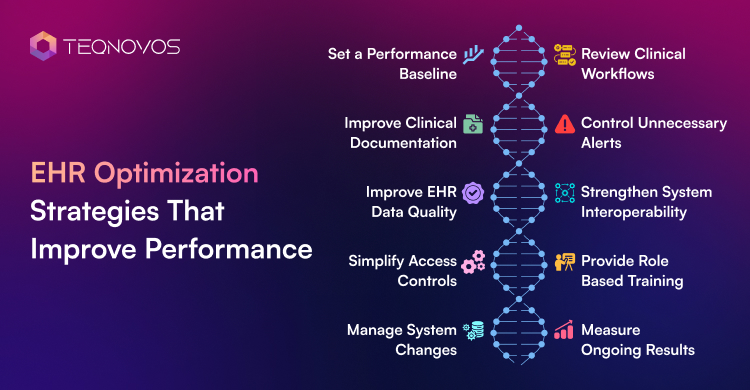
Strong EHR optimization strategies focus on real workflow problems instead of surface level system changes. Each improvement needs a clear purpose. It also needs measurable results. Healthcare practices can use the following strategies to improve usability and reduce operational friction.
1. Set a Performance Baseline
Every optimization effort needs a clear starting point. Healthcare teams must measure current performance before changing workflows or system settings. This baseline shows where delays happen and which issues create the greatest impact. It also helps leaders compare results after each update.
- Average documentation time
- Number of support requests
- Duplicate patient records
- Billing errors and rework
2. Review Clinical Workflows
EHR problems often begin with poorly designed workflows. Teams need to map how each task moves through the practice. This review can reveal repeated data entry and unnecessary approvals. It can also uncover steps that no longer support clinical needs. A structured approach to electronic medical record modernization can help practices improve older systems and disconnected processes.
- Map every major user task
- Identify repeated manual steps
- Remove unnecessary approvals
- Review delays between departments
3. Improve Clinical Documentation
Documentation templates must reflect the needs of each clinical role. Generic templates can create long notes and missing information. Structured fields can improve consistency and make records easier to review. Some practices also use AI medical dictation software development to support faster note creation and reduce manual typing.
- Create specialty focused templates
- Remove unused documentation fields
- Standardize common note formats
- Review voice documentation options
4. Control Unnecessary Alerts
Too many alerts can reduce attention and create user frustration. Staff may begin to ignore warnings when every alert appears urgent. Healthcare teams need to review which alerts add clinical value. They also need to assign alerts to the correct roles and set suitable escalation rules.
- Remove low value notifications
- Adjust alert timing
- Assign alerts by user role
- Review alert override patterns
5. Improve EHR Data Quality
Poor data quality can affect reporting and billing. It can also weaken clinical decisions and system integrations. Healthcare practices need clear standards for entering and updating information. Regular data reviews can identify duplicate records and missing fields before they create larger problems.
- Remove duplicate patient records
- Correct inconsistent data formats
- Review missing required fields
- Update outdated patient information
6. Strengthen System Interoperability
An EHR creates more value when it connects with other healthcare systems. These may include laboratories and billing tools. Patient portals and medical devices may also need secure data exchange. Reliable healthcare interoperability solutions can reduce manual transfers and improve access to complete patient information.
- Review current system connections
- Identify failed data exchanges
- Standardize data formats
- Test each integration regularly
7. Simplify Access Controls
Security controls must protect patient information without blocking daily work. Each user needs access based on job responsibilities. Healthcare practices also need regular access reviews and clear authentication policies. Strong patient data security in healthcare app development can support safer workflows and more reliable system use.
- Use role based access
- Review inactive user accounts
- Strengthen login protection
- Track system access activity
8. Provide Role Based Training
One general training session rarely meets every user’s needs. Clinicians and billing teams use the EHR in different ways. Front desk staff and administrators also follow separate workflows. Training must focus on the tasks each group performs every day.
- Train users by job role
- Use real workflow examples
- Provide short refresher sessions
- Track common user questions
9. Manage System Changes
Even a useful update can fail without staff support. Healthcare leaders need to explain why each change matters. They also need to involve users before the new process launches. Early feedback can reveal practical issues that technical teams may miss.
- Include staff in planning
- Test changes with small groups
- Select department champions
- Share clear launch instructions
10. Measure Ongoing Results
EHR optimization is not a one time project. Workflows and clinical needs continue to change. New systems may also enter the practice. Regular reviews help teams find new problems before they affect daily operations. Each review must connect back to the original EHR optimization plan. Organizations without a dedicated technical team may use healthcare managed IT solutions to monitor system performance and manage recurring EHR issues.
- Compare results with the baseline
- Review user satisfaction
- Audit workflows and security
- Plan the next improvement cycle
Build an EHR System That Supports Every Clinical Workflow. Talk to Our Healthcare Experts!
Schedule a CallA Step by Step Guide to Building an EHR Optimization Plan
A clear EHR optimization plan gives every improvement a defined purpose. It helps healthcare practices focus on real problems instead of making random system changes. The plan also creates accountability and supports measurable progress.
Step 1: Define the Main Problem
The practice must identify the issue with the greatest impact. It may involve slow documentation or repeated data entry. It also involves poor system connections or weak user adoption. A clear problem statement keeps the project focused.
Step 2: Collect Baseline Data
The team needs to measure current performance before making changes. Useful data may include documentation, time, and support requests. Billing rework and failed data exchanges also reveal workflow gaps.
Step 3: Rank Improvement Priorities
Not every issue needs immediate action. The team can score each problem based on clinical risk and operational impact. Implementation effort and technical dependency also need review. This process helps the EHR optimization plan focus on changes that offer the most value.
Step 4: Assign Clear Ownership
Each task needs one responsible owner. Clinical leaders can guide workflow decisions. Technical teams can manage system changes. Compliance teams can review privacy and security requirements. Vendors or external specialists can support complex integrations.
Step 5: Test Changes Before Release
The practice must test every major update with a small user group. This approach helps the team identify usability problems before a full launch. Feedback from real users can also improve training and system settings.
Step 6: Measure the Result
The team must compare new results with the original baseline. The EHR optimization plan needs clear success measures. These may include faster documentation and fewer support requests. Better data accuracy and stronger user satisfaction can also show progress.
Choosing the Right Support Model for EHR Optimization
Healthcare practices can manage some EHR improvements with internal resources. Their teams already understand daily workflows and user concerns. This knowledge supports faster decisions for template updates and access reviews. Internal teams can also handle staff training and basic data cleanup.
Complex projects often need wider technical expertise. System integrations and workflow redesign can require skills that may not exist within the practice. Professional EHR optimization services can provide focused support for these needs. External specialists can also help teams manage testing and security planning.
| Factor | Internal Team | External Support |
| System knowledge | Strong knowledge of current workflows | Wider experience across EHR platforms |
| Healthcare workflow skills | Depends on the available staff | Often includes healthcare specialists |
| Integration experience | May be limited | Suitable for complex system connections |
| Project speed | Depends on internal capacity | Adds focused technical resources |
| Long term support | Managed by the practice | Defined through the service agreement |
Healthcare leaders must review experience before selecting EHR optimization consulting services. The provider needs knowledge of clinical workflows and healthcare data security. Strong interoperability skills also matter for connected systems.
Reliable consulting services for EHR optimization must begin with clear goals and measurable outcomes. Teqnovos offers custom healthcare app development services that support secure integrations and healthcare workflow improvements.
Common EHR Optimization Mistakes That Can Limit Practice Performance
Even strong EHR optimization strategies can fail when teams make changes without clear goals or user input. Small planning gaps can create new workflow problems and reduce staff trust. Healthcare practices need to identify these mistakes early so each update delivers measurable value.
1. Skipping the Performance Baseline
Some practices update templates and settings before measuring current performance. This makes progress difficult to prove. The team needs a reliable baseline before making any change.
- Record average documentation time
- Track common support requests
- Measure billing rework
- Review current user satisfaction
2. Ignoring Staff Feedback
Clinicians and administrative teams use the EHR during daily work. Their feedback can reveal delays that system reports may not show. Leaders need to include these users throughout the optimization process.
- Hold short feedback sessions
- Collect concerns by user role
- Review repeated workflow complaints
- Involve users during testing
3. Adding More Tools Too Soon
New software cannot repair a poorly designed workflow. Another platform may add more steps and create disconnected data. The practice needs to solve the process issue before selecting a new tool.
- Identify the original workflow problem
- Review existing system functions
- Remove unnecessary process steps
- Add tools only when required
4. Treating Training as a Single Event
One training session cannot support every role or system update. Staff members use different functions and face different challenges. Regular guidance helps users build confidence and follow the correct process.
- Create training for each role
- Use real practice workflows
- Provide regular refresher sessions
- Track common user errors
5. Focusing Only on System Speed
A faster platform does not always create a better user experience. Poor navigation and weak templates can still slow daily work. The practice needs to review speed alongside accuracy and usability.
- Measure task completion time
- Review screen navigation
- Assess documentation quality
- Monitor user confidence
6. Overlooking Data Security
Workflow updates can create new access and privacy risks. A faster process must not weaken patient data protection. Every system change needs a security review before release.
- Review user access levels
- Remove inactive accounts
- Test authentication controls
- Track unusual access activity
7. Failing to Measure Results
Some teams complete an update and move to the next task without reviewing its impact. This approach can hide failed changes. Regular measurement shows which improvements deliver real value.
- Compare results with the baseline
- Review performance after launch
- Collect user feedback
- Adjust weak processes quickly
8. Copying Another Practice
Every healthcare practice has different workflows and staffing needs. A solution that works in one setting may create problems in another. Each improvement must reflect local priorities and system limits.
- Review current practice needs
- Consider available staff resources
- Test changes before release
- Adapt every process locally
9. Overlooking Data Security
Workflow updates can create new access and privacy risks. A faster process must not weaken patient data protection. Every system change needs a security review before release. Healthcare organizations can use healthcare IT compliance solutions to align EHR changes with privacy rules and secure data handling standards.
- Review user access levels
- Remove inactive accounts
- Test authentication controls
- Track unusual access activity
Affordable EHR Improvements for Smaller Healthcare Practices
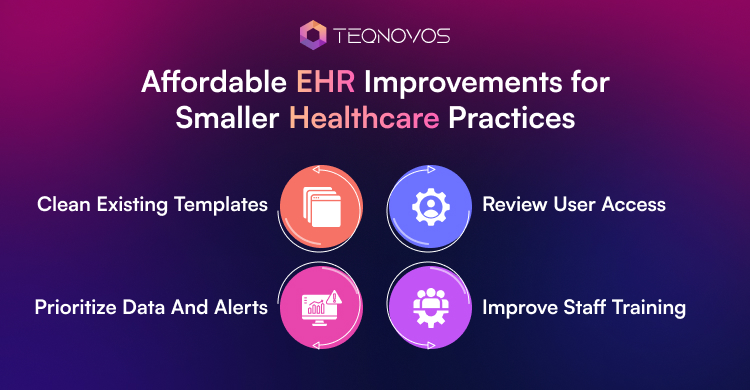
Smaller healthcare practices often work with limited budgets and smaller technical teams. A complete EHR replacement may not be practical. Focused improvements can still reduce daily workload and improve system performance.
1. Clean Existing Templates
Outdated templates can create long notes and repeated fields. The practice can remove unused sections and simplify common documentation formats. This change can improve note quality without major development work.
2. Review User Access
Staff access must match current job roles. Inactive accounts and unnecessary permissions can create security risks. Regular access reviews help protect patient data and simplify system use.
3. Improve Staff Training
Short role based sessions can solve common workflow problems. The practice can focus training on frequent errors and repeated support requests. Refresher sessions can also support new staff members.
4. Prioritize Data and Alerts
Duplicate records and low value alerts can slow daily work. The team can clean critical data first and remove alerts that add little value. These focused changes can support affordable EHR practice management solutions without a costly system replacement.
Strengthen EHR Security Without Slowing Daily Operations. Talk to Our EHR Experts!
Schedule a CallConclusion
Effective EHR optimization strategies help healthcare organizations improve daily workflows and reduce unnecessary system friction. Better templates can support faster documentation. Stronger integrations can improve access to patient data. Clear access controls can also protect sensitive health information.
A successful approach begins with a clear baseline and defined priorities. It also requires staff input and regular performance reviews.
Teqnovos helps healthcare organizations improve EHR workflows through secure integrations and EHR software development services. Connect with our team to plan your EHR modernization project.