



























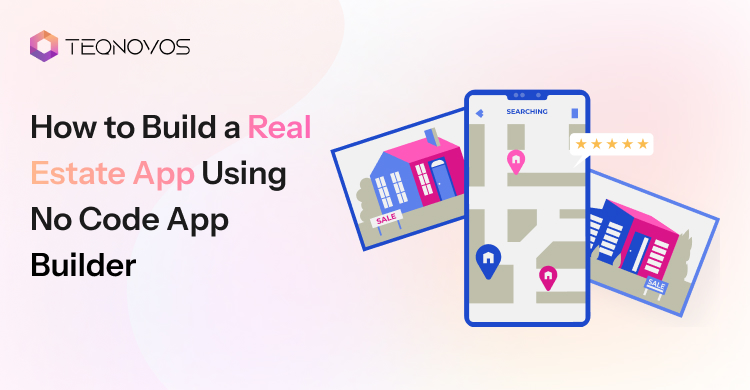
How to Build a Real Estate App Using No Code App Builder
Property search has moved beyond phone calls and static website pages. Buyers want live listings they can view easily. Renters want quick messages; on the other hand, agents want faster lead updates. A digital application brings these actions into one place.
That is why many property businesses now explore no code app development before investing in a full custom platform. It helps businesses to test an idea before spending on a full custom platform.
This guide explains how a business can build real estate app using no code app builder tools and create a working product without starting with heavy development costs.
What Is a No Code Real Estate App
A no code real estate app is a property app built with visual tools instead of full coding. It helps agencies and property managers create workflows without building every feature from scratch. Teams can use ready screens to manage listings and updates in one place.
A no code app builder gives teams templates, databases, and integrations. It helps them control property details without handling complex code. This makes the first version easier to plan and improve.
A no code real estate app usually includes:
- Visual app screens for faster design
- Ready templates for property use cases
- Property listing pages with images and details
- User forms for inquiries and visit requests
- Admin dashboards for managing listings and leads
- Third party integrations for maps, CRM, and payments
Build a Real Estate App Faster With No Code.
Schedule a CallWhy Businesses Use No Code for Real Estate App Development
Real estate startups, agencies, brokers, and property managers often need to test digital ideas before building a large platform. No code app development gives them a practical way to create an MVP with less cost and technical pressure.
1. Faster Launch
No code helps teams move from idea to working app faster. A business can create listing screens and lead flows without waiting for a long build cycle.
2. Lower Early Cost
Early app budgets need control. No code reduces the first build cost because teams use ready tools and visual workflows instead of full custom coding.
3. Easier Testing
A property business can test how users search, view listings, send inquiries, and book visits. This helps teams improve the app with real feedback.
4. Simple Updates
Teams can update content and workflows with less effort. This helps agents and managers keep the app useful as business needs change.
5. Better Idea Validation
No code helps businesses test demand before investing in full real estate app development. It gives teams a clear view of what users want and what features matter most.
6. Less Technical Dependency
No code reduces the need for constant developer support in the early stage. It gives property teams more control over basic changes and daily updates.
Real Estate App Ideas Businesses Can Build With No Code
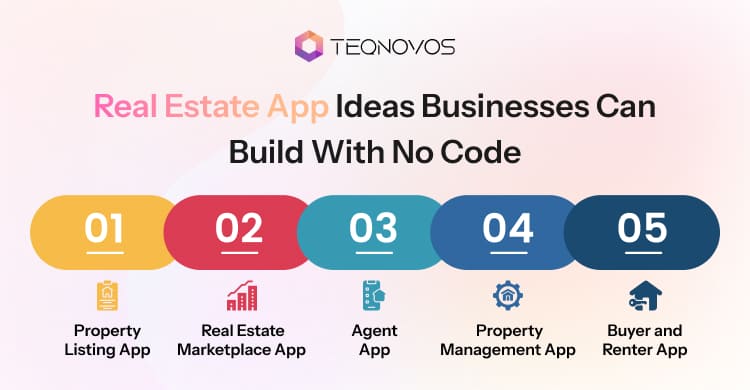
Every property business has a different goal. Some need better listing while others need different tools for faster handling. The best app type depends on the users and their daily workflow.
1. Property Listing App
Powerful listing apps help agencies show apartments and commercial spaces in one place. A property listing app builder assists teams in adding core listing features faster. It also works well for businesses that want to build property listing app features before moving to a larger platform.
- Shows active property listings
- Supports property search
- Collects buyer inquiries
- Helps agents update details
2. Buyer and Renter App
Smart search apps make property discovery easier for buyers and renters. Users can explore homes as per the desired location. They can save options and send inquiries without long phone calls. This app type improves the way users compare properties and connect with agents.
- Supports search filters
- Saves preferred properties
- Shows location view
- Sends inquiry forms
3. Agent App
Focused agent apps give sales teams better control over leads and client updates. Agents can manage daily tasks through one app instead of using scattered tools. This improves follow ups and reduces missed opportunities.
- Tracks new leads
- Updates the property status
- Schedules property visits
- Manages client follow ups
4. Property Management App
Practical management apps support rent records and maintenance updates. Businesses planning property management app development can start with simple workflows first. They can then add more features as operations grow.
- Tracks rent details
- Manages tenant requests
- Stores key documents
- Shares owner updates
5. Real Estate Marketplace App
Scalable marketplace apps connect buyers, sellers, and developers through one platform. This model works well for businesses that want to manage many users and property actions in one place. It needs clearer planning because each user group has a different goal.
- Connects multiple users
- Lists different property types
- Supports lead routing
- Handles user accounts
Build a Real Estate App Faster With No Code.
Schedule a CallMust Have Features in a No Code Real Estate App
The right features shape how useful a no code real estate app feels to buyers and managers. Each feature must support one clear action. A business can review key real estate app features before finalizing the app plan.
1. Property Listings
Strong listing pages help users understand each property faster. They show key details in a clean layout and make property browsing simple.
2. Search Filters
Smart filters help users find the right property without wasting time. They make searches faster and improve the user journey.
3. Map Search
Accurate map search makes property discovery more visual. Users can compare listings by area and location.
4. Media Gallery
High quality visuals build trust before a user visits the property. Images and videos help users understand the space better.
5. Inquiry Form
Simple forms help teams collect serious leads. Users can ask questions, request details, or book the next step through the app.
6. User Login
Secure login helps users save searches and track activity. It also keeps user data more organized for the business.
7. Agent Profile
Trusted profiles make communication easier. Users can view agent details and contact the right person faster.
8. Saved Properties
Useful saved lists help users return to properties they liked. This keeps the search journey smooth and easy.
9. Visit Booking
Easy booking helps users schedule property visits faster. Agents can also manage visit requests with better control.
10. Mortgage Tool
Helpful calculators give buyers a quick payment estimate. This supports better decisions before they contact an agent.
11. Push Alerts
Timely alerts keep users updated about new listing price changes, messages, and visit reminders. This keeps the app active after the first visit.
12. Admin Panel
Clean dashboards help teams manage listings, leads, users, and updates. They give the business better control over daily app activity.
13. CRM Integration
Powerful Customer Relationship Management or CRM integration helps teams move leads into their sales system. It supports faster follow ups and better lead tracking.
Step-by-Step Process to Build a Real Estate App Using No Code App Builder
A clear process helps property businesses move from idea to launch with fewer mistakes. It also helps teams avoid random features and focus on real user needs. The steps below explain how a business can build real estate app using no code app builder tools practically.
Step 1. Define App Goal: Start with the main purpose of the app. A business must know if the app will support listings, leads, tenant requests, or internal teams. This decision shapes every screen feature and workflow.
Step 2. Choose Builder: Select a real estate app builder that supports the app goal. The tool must support mobile apps, CRM connections, and future growth. A real estate mobile app builder works better when the business wants Android and iOS apps instead of only a web app.
Step 3. Plan Database: Build the property database before designing screens. Add property title, price, location, size, images, agent details, amenities, and availability. A clean database makes search filters and admin updates easier to manage.
Step 4. Design Screens: Create the main screens around the user journey. The app may need a home screen, listing screen, property detail screen, and admin dashboard. Each screen must help users take one clear action.
Step 5. Add Roles: Set different access for everyone. Buyers may search and save properties. Agents may update listings and manage leads. Admins may control users’ data and app settings. This keeps the app organized and secure.
Step 6. Add Search: Make search simple and useful. Real estate users often start with location and availability. Good filters help users find the right property faster and reduce drop offs.
Step 7. Add Forms: Use inquiry and lead forms to collect serious interest. Forms can capture name, phone, email, property interest, and message. This helps agents follow up faster and track new leads in one place.
Step 8. Connect Tools: Add useful integrations based on the app type. Maps help users view locations. CRM tools help teams manage leads. Email tools support messages. Payment gateways support paid actions. Calendars help with visit booking.
Step 9. Test App: Test every important action before launch. Check app speed and mobile screens. Also, test how listings appear on different devices. This step helps remove errors before real users start using the app.
Step 10. Launch App: Launch the app based on the builder support. A business can publish it as an Android app or an iOS app. After launch, teams must track user behavior and improve the app step by step. This helps them create a real estate app that stays useful after the first release.
How Much Does It Cost to Create a Real Estate App With No Code
The cost to create a real estate app with no code depends on the app type and other features to integrate. A simple listing app costs less because it needs fewer screens and basic workflows. A larger app costs more when it needs user roles or CRM setup and app store support.
| App Type | Estimated Cost | Best For |
| Basic listing app | $1,000 to $5,000 | Listing forms and simple admin control |
| Mid level app | $5,000 to $15,000 | Search dashboards, integrations, and lead flows |
| Advanced app | $15,000 or more | Marketplace logic, custom workflows, and mobile launch |
These are only estimated ranges. The final budget can change based on design depth and support needs.
The goal is not to spend on every feature at once. The goal is to validate the idea first. Once users start engaging, the business can improve design performance and custom features step by step.
Businesses that want to compare no code pricing with full custom build pricing can review this guide on real estate app development cost before planning the budget.
Best No Code Tools for Real Estate Apps
Not every no code tool fits every real estate idea. Some tools work better for marketplaces. Some work better for listings portals or mobile apps. The right choice depends on app size and launch plan.
| Tool | Best For | Why It Works |
| Bubble | Marketplace apps | It supports custom workflows, user roles, and complex app logic |
| Adalo | Mobile first apps | It supports native Android, iOS, and web app publishing |
| Glide | Internal property apps | It works well for dashboards, portals, and data based tools |
| Softr | Simple listing portals | It helps teams build portals, directories, and internal tools |
| FlutterFlow | Scalable mobile apps | It supports visual app building for mobile web and desktop |
| Jotform Apps | Simple real estate apps | It supports forms, templates, property listings, and showings |
A business must not choose a tool only because it looks popular. It must check database limits and integration options before making a final choice.
No Code or Custom Build: Which Works Better
No code and custom development serve different stages of a real estate app. No code helps a business test an idea faster. Custom development helps the app grow when workflows and data become more complex.
Choose No Code First
Start with no code when the goal is speed validation and a simple launch. It works well for an MVP as the first working version of an app with only the core features. It also supports small listing apps and basic booking systems.
- Quick Launch
- Test Demands
- Simple Workflow
- Controlled Budget
Move to Custom Build
Shift to custom real estate app development when the app needs deeper control. Large marketplaces with heavy traffic apps and MLS style integrations need stronger architecture. AI based recommendations and enterprise security also need a custom build.
- Handles many Users
- Advanced Logic
- Connects with Large Systems
- Stronger Security
Make the Right Choice
No code is useful for an MVP. Custom development is better for scale. A real estate app development company can help when the app needs better planning and long term support. Businesses can also hire real estate app developers when no code tools start limiting growth.
Common Challenges in No-Code Real Estate App Development
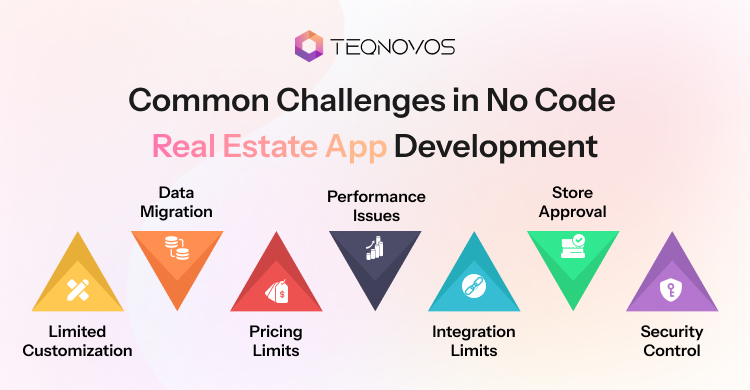
No code makes app building faster. Yet property businesses still need to plan limits before launch. These challenges help teams make better decisions and avoid costly fixes later.
1. Limited Customization
Some builders limit how far a business can change design logic or workflows. This can become a problem when the app needs unique search rules or marketplace features.
2. Data Migration
Property data can become hard to move when the app grows. Listings and documents need a clean structure from the start. Poor data planning can slow future upgrades.
3. Pricing Limits
Builder plans may look affordable at first. Costs can rise when the app needs more user storage workflows or integrations. Teams need to check plan limits before choosing a tool.
4. Performance Issues
Large images and many users can affect speed. A slow app can hurt user experience and reduce inquiries. Testing performance early helps avoid this issue.
5. Integration Limits
Some tools do not support every third party connection. Maps and CRM systems may need extra setup. This can create limits for growing real estate teams.
6. Store Approval
Publishing on Android or iOS depends on builder support and app store rules. Some apps may need changes before approval. Teams need to check this before launch.
7. Security Control
No code tools may offer limited control over data security. Property apps often handle user details and documents. Businesses need strong access rules and safe data handling.
How to Make the App Scalable and Secure
A real estate app needs a strong setup before more users’ listings and workflows are added. Scaling is not only about adding features. It also needs safe access and reliable systems. Apps with tenant requests and maintenance flows can also connect with property management software development planning as the business grows.
1. Secure Login
Strong login protects user accounts and property data. It helps buyers and admins use the app safely.
- Use secure sign in
- Add password rules
- Support account recovery
- Review login activity
2. Access Rules
Role based access means each user only sees the data and tools they need. This keeps the app safe and easier to manage.
- Set buyer access
- Set agent access
- Set tenant access
- Set admin access
3. Data Backup
Reliable backups protect listing leads, documents, and user records. They also help the business recover data after errors or system issues.
- Back up property data
- Save lead records
- Protect user details
- Restore data quickly
4. Clean Database
A clean database keeps property records and inquiries organized. It also makes future updates easier as the app grows.
- Use clear fields
- Remove duplicate data
- Group property records
- Keep entries updated
5. Fast Images
Optimized images help property pages load faster. This matters because slow galleries can reduce user interest and app engagement.
- Compress large images
- Use clear file names
- Avoid heavy galleries
- Test mobile loading
6. Reliable Hosting
Stable hosting supports speed and user access. It becomes more important when traffic listings and user data increase.
- Choose stable hosting
- Check uptime records
- Monitor app speed
- Plan traffic growth
7. Spam Protection
Smart form protection reduces fake inquiries and bot activity. It helps agents focus on better quality leads.
- Add form checks
- Limit fake entries
- Block spam bots
- Review lead quality
8. Payment Security
Safe payment setup protects users during paid actions. This matters for booking fees and other payment based workflows.
- Use trusted gateways
- Protect payment data
- Test checkout flows
- Track payment errors
When Businesses Need a Real Estate App Development Company
A no code builder is useful when a business wants to launch fast and test the first version. It helps teams build simple listings and dashboards without a full custom build. This works well during the early stage.
1. Custom Features
A real estate app development company becomes useful when the app needs features that a builder cannot support. This can include advanced search agent workflows or custom dashboards.
2. Deeper Integrations
Growing apps often need stronger connections with CRM tools and property databases. A development team can build these connections with better control and fewer limits.
3. Stronger Security
Real estate apps handle user data, property records, payment details, and documents. Custom development helps add secure access and stronger protection for different users.
4. Long Term Scaling
No code can support the first launch. Custom support becomes important when traffic grows and workflows become more complex. Businesses can also hire dedicated developers when the app needs ongoing improvements and technical support.
Turn Your Property App Idea Into a Live Product.
Schedule a CallConclusion
No code gives property businesses a faster way to turn an idea into a working app. Teams can test listings and admin workflows before investing in a larger platform. This approach helps them learn what users need and improve the app with real feedback.
A growing app may need custom support when traffic increases or workflows become complex. Stronger security and better performance often need expert development. This guide showed how businesses can build real estate app using no code app builder tools and then scale with the right technical support.
Book your free demo with Teqnovos to get started on your real estate application today!